
Audition Crashing & Lost Work
Hi,
Can someone please assist me with this.
Audition had been working fine for me consistenly, however within the last week or so, it had crashed repeatedly when doing simple tasks like Merging or applying an effects rack. Each time it does this, when attempting to recover it fails reading 'Warning: X number of clips has no file asset' and my most recent crash ALSO had made no back up files for the past two hours despite being set to do so for every ten minutes. It crashes with no warning, and I'm working on a brand new Macbook Pro.
I can't for the life of me figure out why it has turned from a reliable piece of software, to a complete mess within days. It's really making my work impossible and I'm already having to look at alternative software.
I have retrieved the Log Files and will post them below along with my System details below. Many thanks.
SYSTEM DETAILS: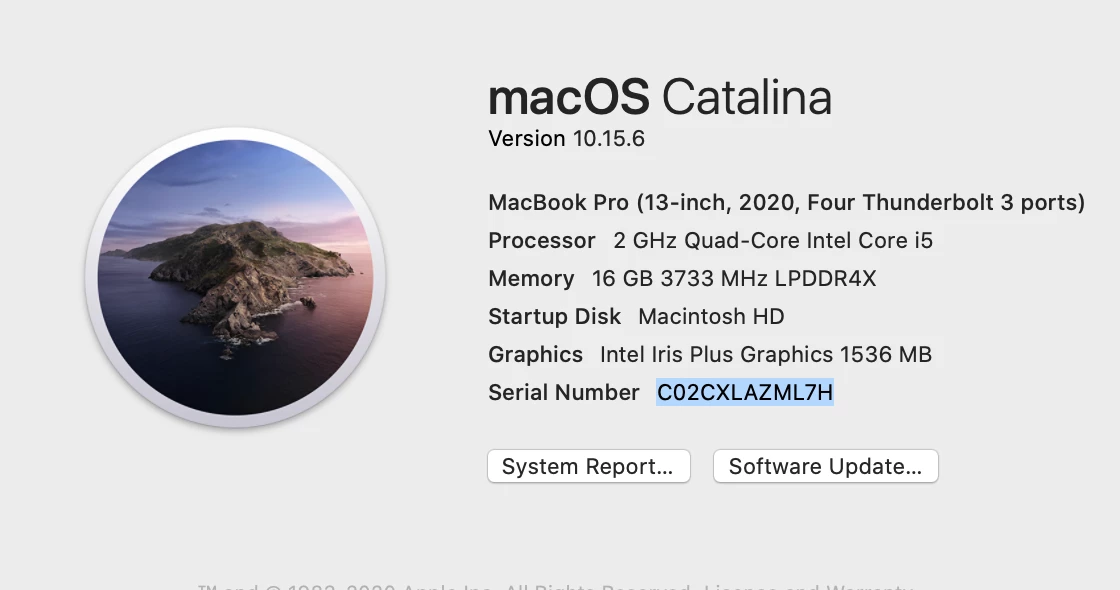
LOG FILES:
Process: Adobe Audition 2020 [69405]
Path: /Applications/Adobe Audition 2020/Adobe Audition 2020.app/Contents/MacOS/Adobe Audition 2020
Identifier: com.adobe.Audition
Version: 13.0.9 (13.0.9.41)
Code Type: X86-64 (Native)
Parent Process: ??? [1]
Responsible: Adobe Audition 2020 [69405]
User ID: 501
Date/Time: 2020-08-29 14:08:20.948 +0100
OS Version: Mac OS X 10.15.6 (19G73)
Report Version: 12
Bridge OS Version: 4.6 (17P6065)
Anonymous UUID: CAC9A62B-0419-498A-BF32-C343844FF856
Sleep/Wake UUID: AA7C4D59-FE52-4CD1-B28A-D0208E865243
Time Awake Since Boot: 110000 seconds
Time Since Wake: 10000 seconds
System Integrity Protection: enabled
Crashed Thread: 0 Dispatch queue: com.apple.main-thread
Exception Type: EXC_BAD_ACCESS (SIGSEGV)
Exception Codes: KERN_INVALID_ADDRESS at 0x00006000423c036a
Exception Note: EXC_CORPSE_NOTIFY
Termination Signal: Segmentation fault: 11
Termination Reason: Namespace SIGNAL, Code 0xb
Terminating Process: Adobe Audition 2020 [69405]
VM Regions Near 0x6000423c036a:
MALLOC_NANO (reserved) 0000600008000000-0000600020000000 [384.0M] rw-/rwx SM=NUL reserved VM address space (unallocated)
-->
STACK GUARD 000070000b9cd000-000070000b9ce000 [ 4K] ---/rwx SM=NUL stack guard for thread 1


 AdChoices