Participant
August 15, 2018
Answered

Audition > Effect > Generate

  • August 15, 2018
  • 2 replies
  • 6413 views

Dear Sir,

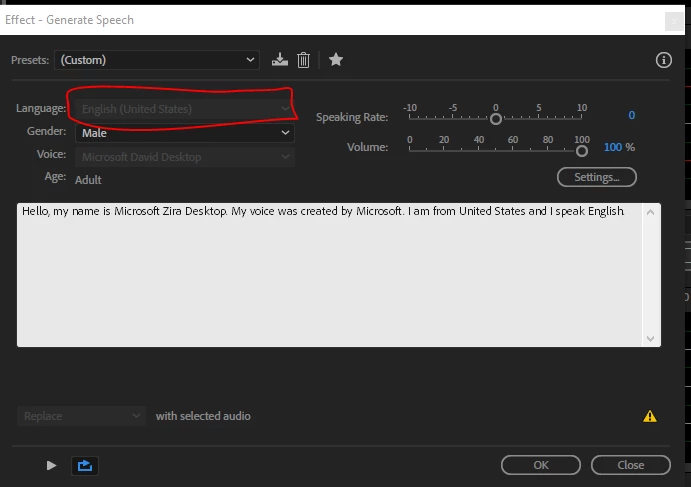
I have Problem about can't change other language, why can't change

Function Problem Adobe Audition > File > New > Audio File > Effect > Generate > Speech (only English)

    This topic has been closed for replies.

    2 replies

    Charles VW
    Inspiring
    August 15, 2018

    The popup menus are disabled if they have only one option. In your case, there's only one Male en_US voice and one Female en_US voice. So they're the only options you have. The link that @SteveG(AudioMasters) gave is helpful. Here's another that shows the Control Panel dialog where you can add more voices from Microsoft: Human speech generation in Adobe Audition - YouTube

    SteveG_AudioMasters_
    Community Expert
    Community Expert
    August 15, 2018

    This is the default language set loaded into the OS. If you look at the help page for text-to-speech, you'll find at the bottom of it where you can load other voices from: Generating text-to-speech using Audition

    Participant
    August 16, 2018

    Sir, i try already but can't work

    Charles VW
    Charles VWCorrect answer
    Inspiring
    August 16, 2018