
Known Participant
December 8, 2018
Answered

Audition functioning improperly since Win10 "upgrade"

  • December 8, 2018
  • 1 reply
  • 928 views

I was forced to upgrade to Win10 pro upon having to replace my mobo and cpu, the i78600k which will not work properly on win7 pro.  My other Adobe software programs are working just fine but Audition is all kinds of wonky and I am unable to get it to work after reinstalling and going back to the 2018 version as well.  I did a quick Camtasia vid to elucidate what is (not)happening.  Any help would be greatly appreciated!     Here is the link:  Audition not working - YouTube
    This topic has been closed for replies.
    Correct answer SteveG_AudioMasters_

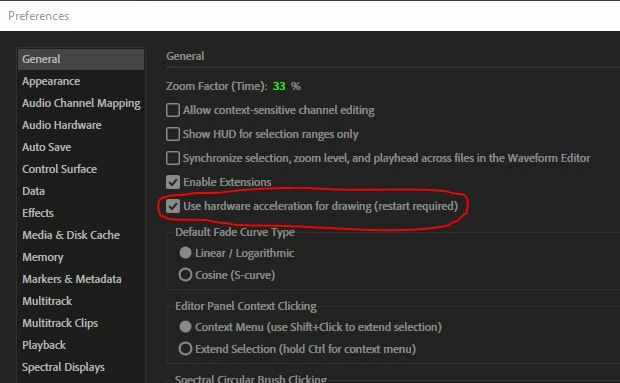
    As far as I can make out from your no-sound video, Audition is doing some sort of a freeze. The first thing you should check is whether the Hardware Acceleration is turned on in Preferences - this can make a significant difference to the visual performance.

    1 reply

    SteveG_AudioMasters_
    Community Expert
    SteveG_AudioMasters_Community ExpertCorrect answer
    Community Expert
    December 8, 2018

    As far as I can make out from your no-sound video, Audition is doing some sort of a freeze. The first thing you should check is whether the Hardware Acceleration is turned on in Preferences - this can make a significant difference to the visual performance.

    Known Participant
    December 8, 2018

    There is sound in the video and I am trying to un-tick or tick the hardware acceleration but the tick box doesn't even appear. 

    Known Participant
    December 8, 2018

    Okay, I clicked in the area of the tick box, saved, closed and restarted and all is well now.  I will have to look into that because my system is very powerful and mostly brand new with all hardware drivers and software properly up to date.  Thanks Steve!!