
Participant
March 28, 2019
Answered

Audition leaving sound artifacts on edits

  • March 28, 2019
  • 2 replies
  • 897 views

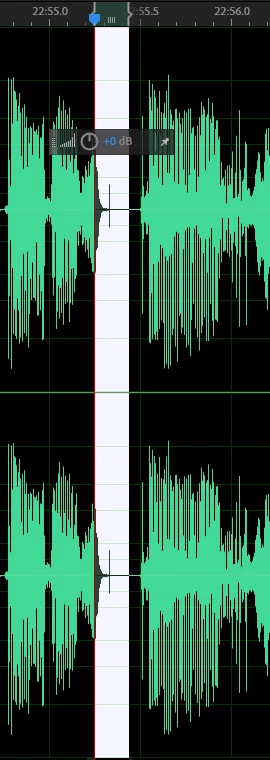
This just started happening today and I've been using the program for months. Whenever I cut, delete or silence a section, a small artifact appears at the edge of my selection. It won't stop doing it and I can't get rid of it as it appears every time I edit it out. I've read about a previous similar situation regarding artifacts and editing and have adjusted the preferences:data to 0ms crossfade to compensate. No change. I've restarted the computer, re-installed the program and it continues to have this issue which now makes it impossible for me to do my work. Has anyone encountered this before. I wonder if it might be a memory issue as my system disk needs to be upgraded due to a decided lack of space, but I've redirected all memory, disk cache and storage to be located on another drive. Really getting frustrated with this. I'm running a Predator Helios 300 with 24G of RAM and about 11G of free space on the system drive. I am using Audition CC 2019. I've enclosed a screenshot of the resultant artifact post edit. Has anyone encountered this issue? How can I get Adobe to behave? Am I doing something wrong?
This topic has been closed for replies.
Correct answer ryclark

Yes, you really need to leave both the crossfade times as something between 2 and 5 mS. Default is 2mS for the first one and 5mS for the second. So make sure that both boxes are ticked as well as the times as above. Having them off or at 0 is likely to actually cause these sort of artefacts. Also it might help to make sure that Snapping is turned on with the Snap to Zero Crossings ticked.

2 replies

SteveG_AudioMasters_
Community Expert
Community Expert
March 28, 2019

gaalene65286551  wrote

I've read about a previous similar situation regarding artifacts and editing and have adjusted the preferences:data to 0ms crossfade to compensate.

I don't know why you think that will work - that's going to cause the problem, not solve it! You need to have the preferences set like this:

The other thing that will help is to make sure you're cutting on zero crossings. So you need the snapping options to include that:

If you make a cut where the signal isn't at zero, you've got a situation where you've created an extra transition (the edge of the cut), and this is very fast - basically it's a transient. And that's what is causing your spike. So you have two layers of protection; the first is to make sure that you don't cut on anything other than a zero point, and the second is that if you do, then it gets smoothed anyway - which is what the Data settings are about. Set those to zero, and you've removed the safety. So put them back!

SteveG_AudioMasters_
Community Expert
Community Expert
March 28, 2019

Snap! (only mine's got pictures...)

ryclark
ryclarkCorrect answer
Participating Frequently
March 28, 2019

Yes, you really need to leave both the crossfade times as something between 2 and 5 mS. Default is 2mS for the first one and 5mS for the second. So make sure that both boxes are ticked as well as the times as above. Having them off or at 0 is likely to actually cause these sort of artefacts. Also it might help to make sure that Snapping is turned on with the Snap to Zero Crossings ticked.

Participant
March 28, 2019

Thanks so much, problem averted.