


Participant
June 29, 2020
Answered

Audition Multitrack Muting Memory

  • June 29, 2020
  • 1 reply
  • 705 views

Hi, I'm running audition on a Macbook Pro with Catalina. 8GB ram 2.3ghz. The problem I'm having is, during playback, audition is remembering when I mute a track in the multitrack editor. I don't know if this is normal, if so how do I remove the tags that are recording where I previously muted the track? The muting and unmuting of the track happens when I am playing the track back in the multitrack editor.

This topic has been closed for replies.
Correct answer SteveG_AudioMasters_

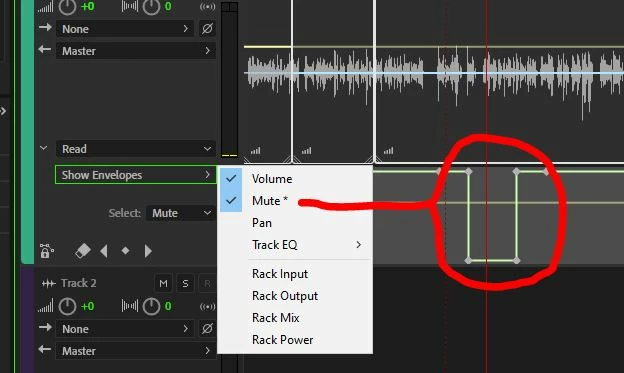
This is normal behaviour if you leave the automation settings for a track set to Write, or Latch. If you don't want anything like that retained by the session file, then set the automation for the track either to Off or Read. If you set it to Read and the track is still remembering what happened previously then you'll have to drill down through the automation lanes and delete the points there - looks like this:

1 reply

SteveG_AudioMasters_
Community Expert
SteveG_AudioMasters_Community ExpertCorrect answer
Community Expert
June 29, 2020

This is normal behaviour if you leave the automation settings for a track set to Write, or Latch. If you don't want anything like that retained by the session file, then set the automation for the track either to Off or Read. If you set it to Read and the track is still remembering what happened previously then you'll have to drill down through the automation lanes and delete the points there - looks like this:

Participant
July 6, 2020

Hi SteveG_AudioMasters_ thank you that helped me. I figured it was something like that, but I am new to Audition and didn’t know how to remove the automation.