
Participant
April 25, 2020
Answered

Audition Multitrack won't record

  • April 25, 2020
  • 1 reply
  • 1077 views

I've looked through a few posts here but nothing seems to be working (but if I missed something please let me know!)


I'm just getting set up on Audition and I'm routing my mic (some kinda cheap Samson I'm borrowing) and my guitar amp through a little Behringer XENYX302USB mixer to Audition. It records & plays back fine in waveform, but when I try to record in multitrack nothing happens.


I've checked that my audio inputs are from the USB source and that my audio channel mapping is as well (although I might be mapping it wrong). Any thoughts/ideas? Been banging my head against the wall for a while now.
This topic has been closed for replies.
Correct answer SteveG_AudioMasters_

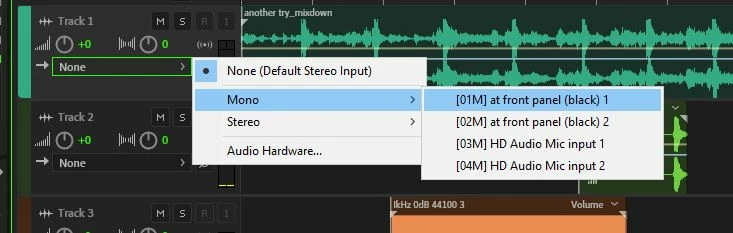
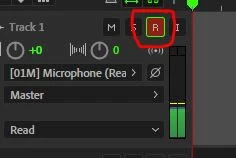
Two things you have to do that a lot of people seem to miss are: 1) select an appropriate input for the track you want to record on, and 2) hit the red R button on the track controls before you start.

1 reply

SteveG_AudioMasters_
Community Expert
SteveG_AudioMasters_Community ExpertCorrect answer
Community Expert
April 25, 2020

Two things you have to do that a lot of people seem to miss are: 1) select an appropriate input for the track you want to record on, and 2) hit the red R button on the track controls before you start.

Participant
April 25, 2020

WOW yep it was the red R button thanks so much!