


Participant
September 5, 2024
Answered

Audition no longer records from the internet or other programs

  • September 5, 2024
  • 2 replies
  • 544 views
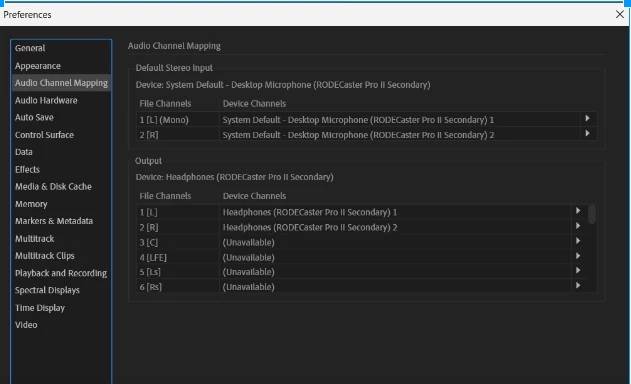
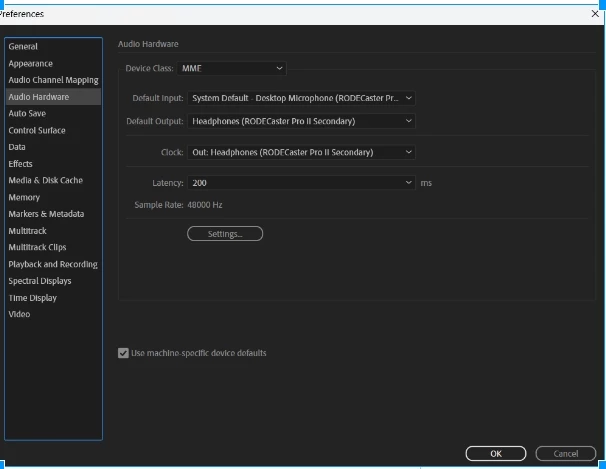
I can no longer record off of the internet or other programs using Adobe Audition. This use to automatically work out of the box. Recording from the microphone still works. I recording using a DAW (Rodecaster board).  I am using Windows 11. I have tried the following:
 
  • Made changes in Adobe Audtion to the recording device
  • Disabled other recording devices in Windows 11 and made the DAW recording device (Rodecaster board the main device)
  • Checked my Google and IE and Firefox browers to allow sound from Rodecaster Device in privacy settings
  • Restarted my computer several times
This is frustrating. I have spent one week trying to get this work and nothing works.  Please help.
Correct answer kevin_0865

Same issue, W11, new version of audition. I am not able to record anything with the stero mix. Even my own recording, being played with VLC or any other player on my computer, is not being picked up. 


I am sorry that you're having this problem. There's a workaround for this, provided that you DAT or modern audio board. I have the Rode 2, and I am running Windows 11. Windows 11 routes my recording devices to record directly from the Rode device. The Rode 2 uses SD card, and I am able to record directly from the internet and other audio outputs. Perhaps, recent updates from Windows 11 or Adobe has disabled this feature. Adobe apparently seems to be mum on this topic. Anyway, I hope this helps. Good luck!

2 replies

Participant
September 12, 2024

It sounds like you've tried several troubleshooting steps already. Here are some additional things to check:

1. **Check Windows Sound Settings**: Ensure that "Stereo Mix" or "What U Hear" is enabled in Sound Control Panel > Recording.
2. **Update Audio Drivers**: Make sure the audio drivers (especially for the Rodecaster) are up to date.
3. **Configure Adobe Audition**: In Audition, go to Preferences > Audio Hardware and make sure your DAW (Rodecaster) is selected as both the Input and Output device.
4. **Browser Settings**: Make sure audio permissions are enabled for the browser you're using.
5. **Test with Other Software**: Try recording with another app (e.g., Audacity) to check if the problem is specific to Adobe Audition.

For more help, you can also check other resources: [https://topfollowapkguru.com](https://topfollowapkguru.com).

Participant
September 28, 2024

Hello Charles,

First and foremost, thank you for taking the time to assist me. I tried all of the steps, and I was able to determine that this problem is related to Adobe. The reason why I say this, is due to the fact, that I tried another sound recording software (Audacity) and I was able to record from the internet and from one of my source radio production software (Sam Broadcaster).  I am at wits end; I also tried this from a fresh installaton on another Windows machine, and I get the same results. I am racking my brain trying to figure out what may be the issue. I am determined to get this resolved. I've reading and researching so much information. At any rate, if you or anyone else, has anything more I can try, please let me know. I thank you. Kind regards, Kevin

Participant
September 21, 2025

Same issue, W11, new version of audition. I am not able to record anything with the stero mix. Even my own recording, being played with VLC or any other player on my computer, is not being picked up. 

Participant
September 5, 2024

I forgot to mention that I am using Adobe Audition version Build 2.4.6.69 on a Windows 11 machines, with all the latest security updates and patches.