


Participant
October 2, 2018
Question

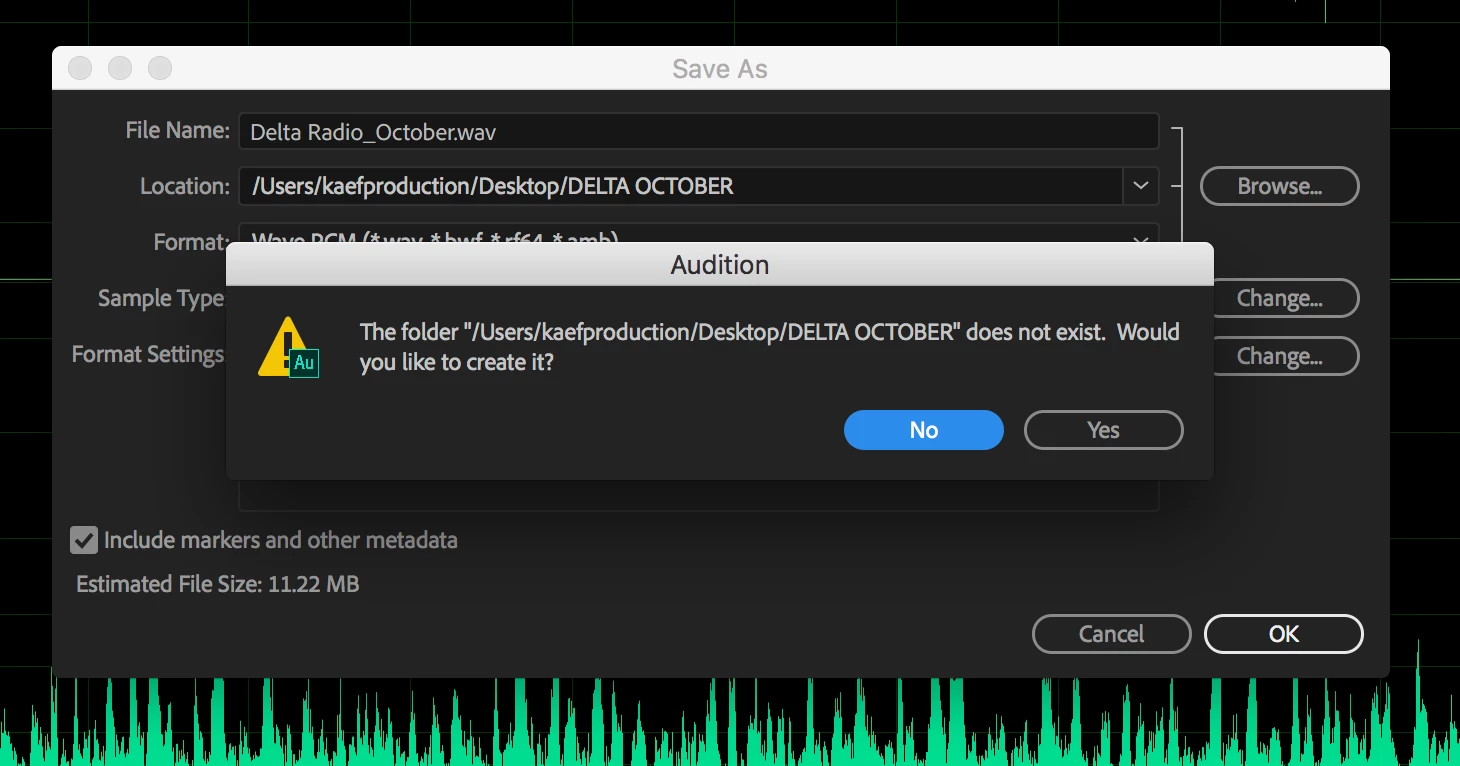
Audition not recognizing folders I made.

  • October 2, 2018
  • 5 replies
  • 1466 views

Hey guys,

Small but annoying and perplexing error message I've been getting for the past few weeks. I finish mixing down my track, go to save it as a .wav or .mp3 and I always pick the project folder that I'm using as the target destination for the export. I'm constantly getting this error message. Audition does not recognize the folder I literally just picked, says it does not exist and forces me to save on the desktop or either make a duplicate folder.

I know it's a small thing but it has caused confusion more than once and adds another step.
This topic has been closed for replies.

5 replies

Participant
April 8, 2024

This is a problem with a random space in the folder name. My project file structure is exactly the same for 2 projects and I could export for one project but not the other - turns out there was a space after the destination folder name in the project where I was getting this error. Just had to rename it, and delete the space.

SuiteSpot
Inspiring
April 8, 2024

As a PC user it makes sense to me - you can't create a folder or filename either starting or ending with a space

Participant
April 9, 2024

Interesting, I wonder why Mac allows it. It's very hard to spot if you don't know what the issue is. It was only through reading this thread that I double checked the naming of my folder and discovered there was a space at the end of the folder name. Not at all obvious, even if you're looking for it. Hope this helps someone with the same confusion

Participant
August 2, 2023

I have the exact same issue. I work on editing projects for weeks and I like to start every day with a new version of the session of the previous day. I save all sessions in the same folder, but now I get the same message. If I click "yes" it creates exactly the same - so already existing - folder and copies all the files in it as well, which is totally unnecessary and very annoying. I now duplicate the session-file in Finder, rename it and then I open it with Audition.


Cheers, Geert


Participating Frequently
May 17, 2021

Hello,

I am having the same issue, have you got it solved?

Thanks,


Ramesh

Participating Frequently
May 16, 2021

Hi, I am having the same problem as well repeatedly. Very annoying. Have you been able to solve it? Please let me know how!

SteveG_AudioMasters_
Community Expert
Community Expert
May 16, 2021

The other thing that has occured to me regarding this is that it's been saved to a particular user account. If you don't have administrator rights to that account, then Audition will claim that it can't access it. But if it really is exactly the same message, what happens if you do as I asked above, and let it create the folder? I didn't get an answer to that...

Participating Frequently
May 16, 2021
Thanks for your response!

I really don’t think it’s a question of administrator rights. It makes me
create a folder which already exists. So I have two folders with the same
name. Basically what happens is that I’m about to save a file, I go to my
documents choose a folder that already exists, and when I try to save, it
says that folder has not been created would you like to create a new one?
So it creates a duplicate folder, with the same name, which is the
bewildering thing.
--


Ramesh Mahtani

Bilingual English & Spanish Voice Over
Locutor bilingüe español e inglés

A Source Connect studio

Tel/WhatsApp: +34 670 965 771
rameshmahtanivox@gmail.com
www.rameshmahtani.com
Skype: riobeatenerife
SteveG_AudioMasters_
Community Expert
Community Expert
October 2, 2018

Strange. If you agree to create it, as the message says, where does it place the folder? And does it complain? You should get a 'this destination already contains a folder named {whateveryoucalledit}' message. Do you get that?

ryclark
Participating Frequently
October 2, 2018

Might it be a problem with having a space in the folder name? Is Audition OK with it if you make a folder with no spaces in the name?