


Inspiring
July 10, 2025
Beantwortet

Audition only records voice.

  • July 10, 2025
  • 2 Antworten
  • 308 Ansichten

Anyone know how to fix this? I have no filters applied. Microphone will only pick up vocals. no claps, music, snaps, ambient noise, my cat, you name it. Adobe help went through my computer and their advise was to use voice memo and edit in audition.... 
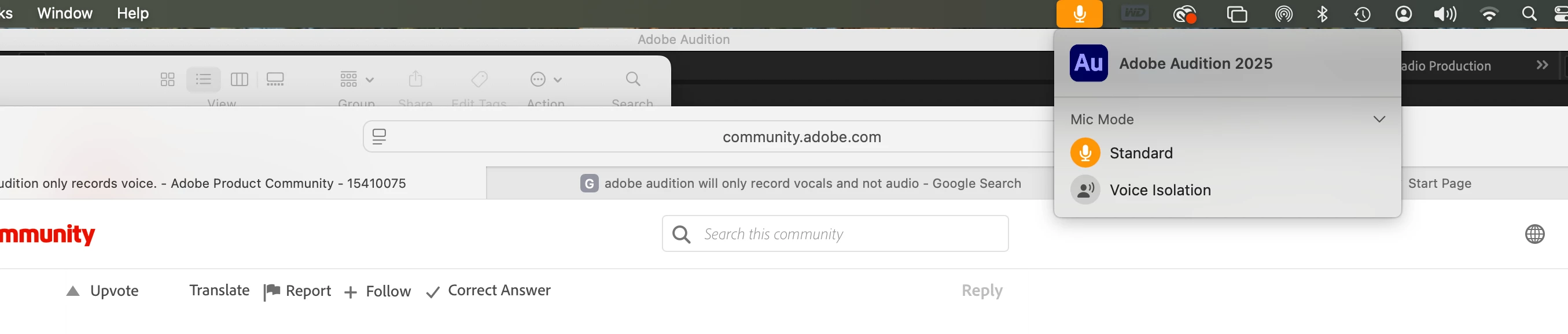
Beste Antwort von Stephen23230308u3la

Hi thanks for the responses. I fixed it and I wanted to post incase anyone has experienced this. On an Imac at the top of the screen there is a microphone icon highlighted in orange. I dont know if this is new for apple or not but if you click on it you get the option for standard or can you believe it (voice isolation) Ive been recording for years and Ive never seen it. 

2 Antworten

SteveG_AudioMasters_
Community Expert
Community Expert
July 11, 2025

Insufficient information, I'm afraid. We need to know what microphone you are using and how it's connected. FWIW, Audition records faithfully what it is sent from whatever sound device you are using, and doesn't (in fact can't) modify anything on the way in, so it's got to be before that, whatever's causing this.

Inspiring
July 11, 2025

Im using a Shure SM27 running through a Focusrite Scarlett Solo. Computer is Imac. Everything updated. Current version of Audition. 

Inspiring
July 11, 2025

When I use Voice memo it records everything. any and all sound using the same microphone and setup.

Inspiring
July 10, 2025

I have no ego. If somebody points out that Im doing something stupid I would be grateful as long as it fixes it.