Participant
April 20, 2020
Answered

Audition Paintbrush grayed out?

  • April 20, 2020
  • 1 reply
  • 3980 views

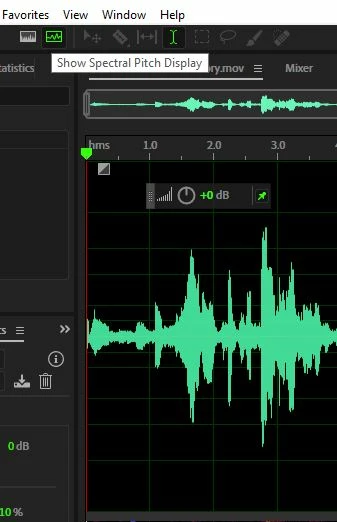
Why is the paintbrush for Adobe Audition grayed out?

I understand that some tools are only available in Multitrack Mode, but the paintbrush is used for altering the SPECTRAL AUDIO! It SHOULD be available to use in Waveform mode. 


And even when I go into Multitrack mode, it is STILL grayed out!


Why is this and how do I fix it?
This topic has been closed for replies.
Correct answer SteveG_AudioMasters_

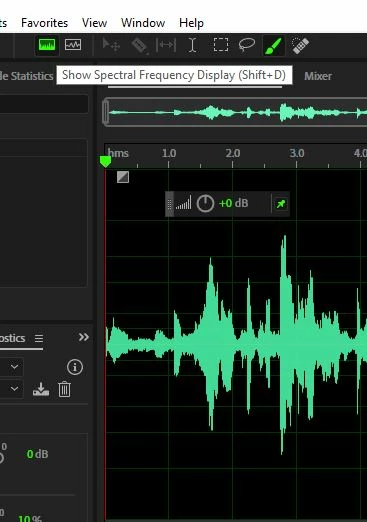
Probably because you're in Spectral Pitch display, not Spectral Frequency - it has no use in Spectral Pitch. Neither do Marquee, Lasso or the Spot Healing Brush, so they're all greyed out in this mode. And it's always greyed out in Multitrack.

The fix? Click on Spectral Frequency to get the tools back.

1 reply

SteveG_AudioMasters_
Community Expert
SteveG_AudioMasters_Community ExpertCorrect answer
Community Expert
April 20, 2020

Probably because you're in Spectral Pitch display, not Spectral Frequency - it has no use in Spectral Pitch. Neither do Marquee, Lasso or the Spot Healing Brush, so they're all greyed out in this mode. And it's always greyed out in Multitrack.

The fix? Click on Spectral Frequency to get the tools back.

Participant
April 21, 2020

Thank you very much!