

Known Participant
January 21, 2020
Question

Audition requests and things that must change

  • January 21, 2020
  • 3 replies
  • 1205 views

First use of Audition.


I’m a very experienced sound and video guy!

I use Premiere pro and give courses for Premiere all over Holland and Belgium (European Parlement) for a Company.

They have asked me to give courses in Audition as well. I was using Nuendo myself.

I’m experienced in Nuendo and Protools.


First look it all seems very logical but I do run into things.


Why are the shortcuts different than in Premiere Pro?

R for razor i.s.o. C?


First thing I do is import a AAF file.

Haha I should not import I should OPEN it. WHY?

Same with OMF files.


Why do I see a very long filelist? These are files I do NOT want to see in the File window.
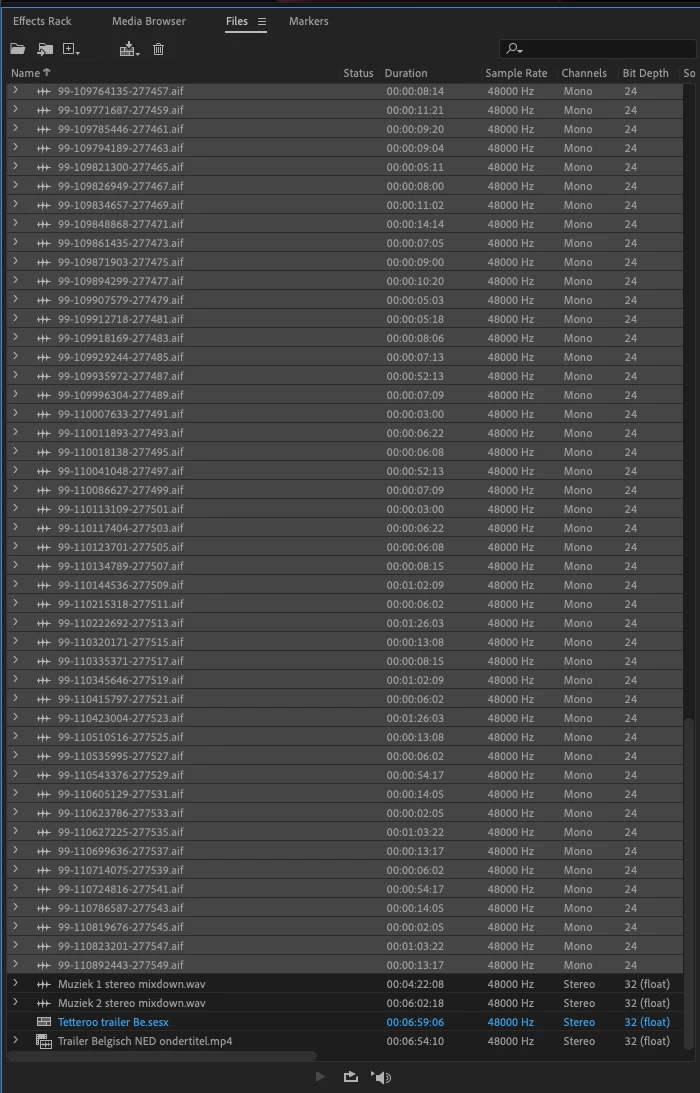
 

This is a AAF of a very simple two minute trailer.

There needs to be a BIN button! Just like in premiere, to clean up this garbage.


Then I imported the videofile that was made for this trailer. It showed up in the file window but when I dragged it into the multitrack it showed only the audio (while dragging), and it would overwrite the top track. So I did… no video!

I needed to make a video track first, then a audio track (for the audio within the videoclip, yes every videoclip has audio!)

Then it would work.

So straight to preferences to see the video on my external monitor!

You know simply set the preference of playback for video to Blackmagic shuttle (which I use for Premiere)!

Where is it?

Oh well I will look at this moving poststamp for a picture, great to make things precise and sync!


I’ve imported eh … oops sorry, I have opened a AAF file. It has a few music track in it that show as dual mono tracks. As it should with AAF and OMF files (all mono content).


I’ve searched (help and the web) for converting mono tracks to stereo but I dearly miss the one button solution!

Why can I not put all the music on two adjacent mono tracks and convert those two tracks to one stereo track (see Nuendo). Or six tracks to one 5.1 Track? (see Nuendo).


There is not the Premiere option to “modify” the files to stereo in the file window. But this would not help since the files are already located in the multitrack and these will not change.


My solution was to export a stereo mix with just two tracks enabled (that is clunky).

I did that twice for the music (they overlap) and two times for stereo effects. (very clunky)

Then I dragged the stereo files to newly created stereo tracks , and lined them up with the originals. Zooming in and dragging the files, zooming in more and more and adjusting the start time of the stereo files… (clunk!). I did this for all the new stereo files… this is not good!


Then I started editing the Voice over.

That was really fine, however it was recorded in several takes that should be the same level and sound. I missed the level setting with right click on the clip (Premiere). Now it shows in properties which is located across from the screen (far away), and it holds the setting, while premiere just changes the gain of the clip and turns to zero (as if nothing happened).

I also needed some eq on several takes. Under right click there is no eq, I had to find the eq in the dropdown menu “effects”, no shortcut. I used the 10 band eq, fine, I could get the sound fine, made a preset. The preset “VO Peter” was way down in the menu. So doing the next clip is clicking on it, then the menu “effects” then drop to EQ> 10Band EQ> preset>VO Peter. Man why???

Now you have the properties window, why not eq in there? (like premiere, copy and paste stuff all over the place to different clips, or even do a copy Paste ATTRIBUTES!

Are you not working with Adobe people? The biggest advantage of all these products from one company is that they are similar in use, are you not friends with the Premiere people? Or with the After Effects people? Please please please!!!

Now you do something half assed in the Effects rack, like it is half a properties window (clip effects) but no copy and paste?

No copy paste in clip effects or track effects.

Beside that no copy and paste of effects in the MIXER?????


Ahh you do a duplicate selected track! Do you want us to use that to copy effects settings to a new track? (cause it will not do this to existing track without overwriting the audio).

Nope that does not do it for me!


Some really good stuff!

You have segment based EQ! And segment based EFX! With crossfades in real time! This would be enough for me to step over to Audition. Thanks for that. I’ve been asking this in Nuendo for ages and nobody seemed to understand why.

In 1993 I worked with DAR systems, one of the first reliable hard disk recording systems.

I have something on my website about it:

https://frankkoppelmans.nl/1993-d-a-r-soundstation-sigma/

Sure the video is dated and a bit long but this system does segment based EQ and sends. Very very powerful! And you have it too!!


I managed to get my VST plugins into Audition, thanks!


Zoom in and out is like premiere Thanks!


Play fast is like premiere (jkl) thanks


Could you add, “click in empty space to set the playhead”, now we have to look for the timebar at the top and click there to set the playhead.


Cursor up and down, next event, previous event? (premiere)


Now this is a bit upsetting:

To end music nicely we engineers very often use reverb at the last note of the music.

As a clip effect this would be really nice (I love clip effects). Why can’t I use it for reverb on the last note?


This does not work.


So then in the mixer with automation:

Nope, I cannot automate a individual plugin just ALL the plugins on a track, but I do not want that, only just reverb on the last note…


Why are there only inserts in the mixer? No proper send and returns?

A send should be simple and easy to automate, send level or send on/off.

For this purpose I would highly recommend the Segment effect, as in the picture, this would be perfect.
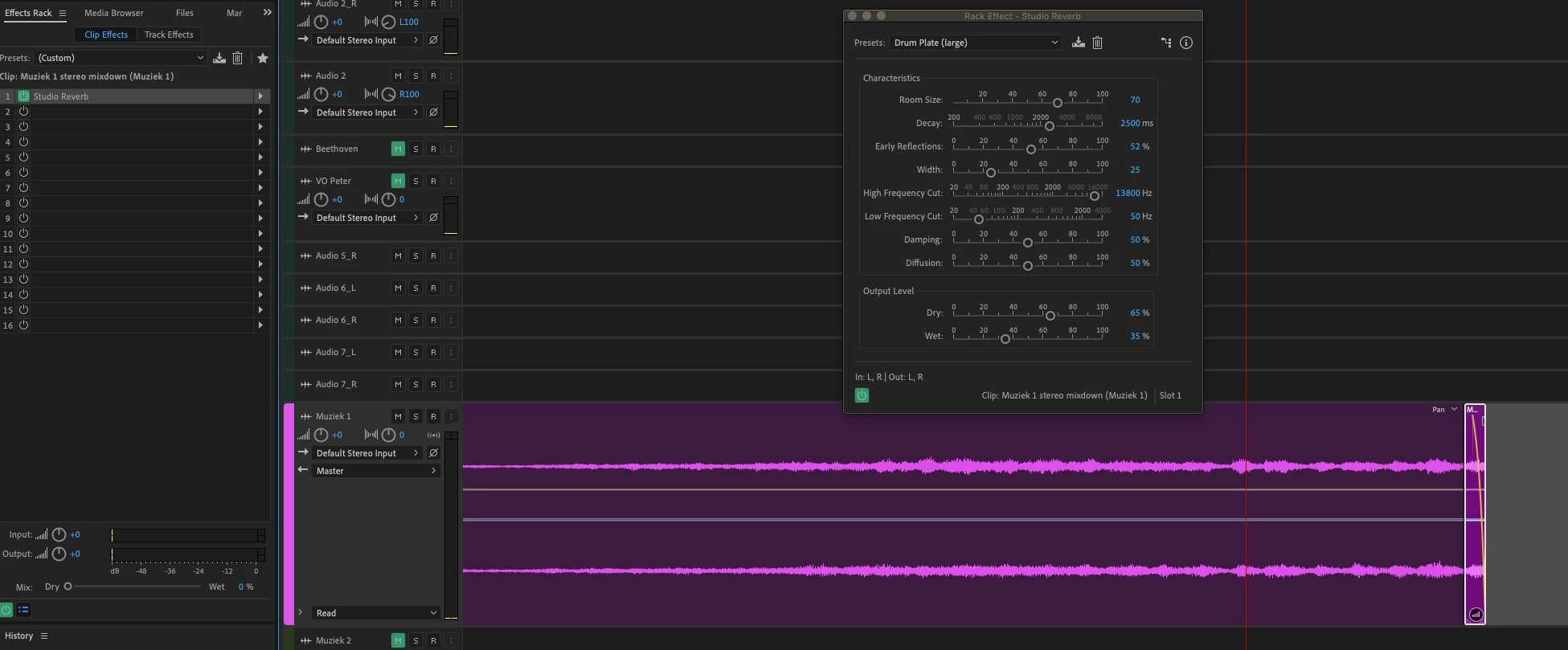
Ahh I checked with a long segment, then reverb works on a segment, but the reverb mutes at the end of the segment, it does not ring on after the segment. In most cases it should ring on after the segment, not however with roomsimulations then it should mute at the end (like it is now). Would be a nice option “mute at clipend”. Also I noticed that the reverb input on a clip effect does not change with a fade-in/out. I think the input to the reverb should be affected by fade in and out (as a send).

A option pre/post fade would be great.


I would like to control Audition by my Yamaha O1Vi so I can move more faders than one at a time. By midi is ok! Just add this to the options of Controll surfaces.


If you now fix these simple things to make life of a audio engineer easier I will tell everybody to use Audition!


With kind regards


Frank 


This topic has been closed for replies.

3 replies

Participant
August 18, 2020

Thank's a lot Frank to try to help on Adobe Audition improvements, cause yes they are some to make !

I'm working in audio post-production AND radio for more than 15 years now. It's an insteresting experience cause I can speak for the both sides. And yes I'm always looking for a better DAW, cause none of them are perfect. Including price, complexity and computer ressources request.

I'm mainly using Audition for simple editing for radio, work fine for that. Multitrack was note the best at all at the begening but they made some interesting improvements.

I'm using Pro Tools for audio post production for cinema movies. Work fine too, even if sometimes things could be easier...

To directly answer to this post about what's lacking with audition... :

Recently I tried to import an OMF in Audition... Errrkk... As you said Fran how the hell couldn't we change a double mono track in as stereo one by just drag and dropping ??? This is just crazy. And just for this reason made Audition not usable for video sound editing. 

In my quest for a better DAW several parameters occurs : 

- A simple workflow and intuitive edit : Audition is on a good way for this, Nuendo and Pro Tools should think better about auto snapping to the playhead, the selection, etc... Like Premiere do it in a very intuitiv manner, the DAW should follow on this point.
- A good handling of the effects... And you are so right on this Frank again. How come developpers didn't understand that we need to copy and past effect from one segment to an other, could be from track to track or from clip to clip, so right. Look like audition accept to copy paste effect on clip, maybe as well for track but not the parameters themselve ? Nuendo simply don't have the ability to copy paste effect from track to track in the arrange/edit windows (OMG...) and both Pro Tools and Nuendo don't allow clip effect I guess... 
Yes sometimes we have 60 or 70 effects or way more to use on different segments of a movie. Color grading tools know hot to handle this. DAW don't ??? Most of time it's just denoise, eq compression, etc... but we need to apply them differently from one segment to another. How do I manage this on Pro Tools ? I juste have to create new track every time, yes that mean dozens and dozens of track at the end... And automated plugins are to complicate to manage from one clip to another. Please guys think a bit more about us... Audition is even on a better way for this than Nuendo and Pro Tools, isn't that crazy ?

- A better handling of fade and crossfade options. We like to have simple but power full cross fade options. For example really often we need an "S" curve for fade in and fade out. Why ? Cause it's the more natural to listen to. Why don't you offer it right away on Audition fades ? Could be really usefull. Tried to made something like this on Pro Tools and Nuendo, didn't find it really. Must be a way, saw something really nice on Wavelabs I guess years ago, but not really find something easy and functional and other DAW. A shame.

- A versatile software, easy to use, not to much asking on computer ressources... I agree I'm asking a lot, but... once again Premiere could work on small computer not that powerfull, but it the same program wich is used for the best movie editor on hollywood movies ! On this point again Audition is in a good place. Nuendo ask for 8 Go of Ram on Windows 10, (don't have it at home but still work). Yes more and more we work also at home and not only in the studio, something versatile would help. Pro Tool ask... for 16 Go of RAM ! Allrights it's a professionnal tool, but once again, have a look at Premiere...

In conclusion, I would like to use Audition for all my works. Work fine for radio use. Not good enough for video sound edit and mix now. But maybe it will in the future. Really like to have the omf import function, wich is rare to find. But should have much more import option (to handle mono stéréo track for example...) Also dropping a double mono track in a stereo on should work, what is that ?? 


SteveG_AudioMasters_
Community Expert
Community Expert
August 18, 2020

S-shaped fade curve? Hold the Ctrl key down whilst dragging the icon. Right-click on the icon for more options too - that in fact have always been there since crossfading was introduced. Want a stereo file in multitrack with separate mono channels on different tracks? Easy. Click on the file's twirldown and it will say 1: Left and 2: Right. Select which one you want and place it on the track you want. Instant split stereo.


Perhaps you should have investigated what's actually there before complaining about it...

SuiteSpot
Inspiring
January 22, 2020

It is always interesting when someone arrives at the party 20 years too late to teach all the other party goers how to suck eggs 😉

Can Audition be improved?

Like any other DAW of course it can and it is but when you have a user base that extends across 20 years no-one wants or will listen to some johnny come lately telling them how it should be.

By all means make suggestions (you will be surprised at how receptive the devs are) but if you don't like things the way they are you don't have to go but you can't stay here 😉

Known Participant
January 22, 2020

It's never too late to learn how to suck eggs.

All the things I came across is from a first impression, to me those are the most important things you run into. I'm not bothered by 20 years of development. The things I mention will not change the way people have used this programm it will only add fuctionality so "maybe" more people will start using this programm since, I think, it has potential. But if all of you are so afraid of change then do not bother to improve, just leave it as it is. Do workarounds for functions that should simply be efficient.

Why can the piece of software, that is already there in Premiere, for using a external monitor not be implemented in Audition. How can anybody NOT ne happy with such improvements. Even after twenty years this is better.

Why can "segment based" Eq and FX not be improved for better functionality while this is one thing that Audition stands out with? (post fade in/out option for efx send, no not in a channel but in a segment!)

If a basic copy and paste of effects with it's settings cannot be done from track to track, or Effects rack to Effects rack, other than creating presets that are on alphabetical order in a list tha you have to scoll down in.... I say yes to copy and paste. You can still do the things you are used to after 20 years.

Copy and paste attributes. why would that not improve usefullness for people using Premiere and having Audition.

Logically having the same shortcuts for softwarepackages of one company. You say I can change the shortcut myself and that is really easy/ Then you can set it back to what you are used to just as easy. It would be far better for users of other Adobe software to have it the same. And you can still do what you are used to for 20 years. This, each on it's own island, is not good for Adobe, whatever way you look at it.

I can stay wherever I like to stay 🙂

SteveG_AudioMasters_
Community Expert
Community Expert
January 21, 2020

You seem not to have investigated some rather basic stuff here, quite frankly. Audition works in conjunction with Premiere (unless Apple have put one of their regular spanners in the works), and as a round trip process, so all these things you are so beloved of in Premiere are still there available to you. No, a load of things aren't going to change, because that would significantly screw up the millions (yes) of Audition users in radio stations who like it as it is, and don't want to have to relearn them. If you are really upset about any of the keystrokes, you can remap them if you want - not a problem.


To answer a few of your comments: First the convert mono to stereo - we've been there before and we know it's not perfect. There's a thread here about that - https://community.adobe.com/t5/audition/omf-aaf-convert-dual-mono-to-stereo/m-p/9445713


As for reverb not continuing past the end of a clip - all I can say is that this was an issue years ago and it works fine here - no problem with reverb tails at all. So I don't know what you were doing wrong, but clearly something...


Most of the rest of your issues are things that Audition already does - it's just that you haven't explored them yet. Look up the difference between clip and track effects, for instance - also if you look, you'll find a comprehensive set of pre- and post-sends and groups available. And the automation system lets you control any available parameter individually; you might need to investigate that some more, too.


Yes there are some things you can't do. One of them is using a Yamaha 01V as a controller. I tried to do this years ago, and got nowhere. One of the primary reasons appears to be that the 01V doesn't like any of the protocols Audition can use. The one it might be persuaded to work with would need all of the MIDI settings altered, and life's too short. Even then it might not work, either. Yes it's a shame. Plenty of other controllers work fine with it, though.


Another thing you can't do is all of this copying and pasting of effects. People have asked about this before, and I sort-of get it, although personally I use rack presets if I want to do anything like that. I don't know if the devs are looking at this currently or not.


One thing you should note though is that what the developers concentrate on is what the big-ticket users want - that's how Adobe makes money. You could come up with some amazing things to do, but if these people want some trivial stuff done, it's them that get listened to. No, I am not joking. Saying 'if you do these things, a few of my mates might use it' doesn't compete with the likes of the big broadcasters, with seats running well into 6, or in one case 7 figures, I'm afraid.

Known Participant
January 21, 2020

Yes you are right, basic!

But nothing is more imporatnt than a first impression, as you well know.

Strange that you do not mention the inability to use a external monitor with audition, how basic can it be?

ono to spereo: The tread you mention is how it shouldn't work. If that is what millions of users do they are using the wrong software. It should be one click!

Ahh the reverb does continue after the clipend, after a restart it worked, thanks.

I did use the different Clip And Track effects. It seems to me that you do not know the difference between a insert effect and a send return effect because there are no sends, just inserts. (as they are in Premiere, only inserts).

If they can do a Mackie interface, a O1V shouldn't be that hard.

You "sort of get" the copy and pasting of effects? Either you do not much work or you do not understand how important this is.

Your last paragraph just reminds me to go on with nuendo quickly. Why do I bother to note these things for developers if they only do the trivial things?

A yes, I was asked to teach audition to new users, I guess I will let that one go by, as I think Audition is below the line of usable at the moment, although it does have my favorite Segment based eq and FX.

I guess I will stear them in the direction of Steineberg...


SteveG_AudioMasters_
Community Expert
Community Expert
January 21, 2020

No sends? You really haven't explored this at all:

There are sends - 16 of them per track.


No you certainly shouldn't be teaching Audition - you really don't know enough about it. And your rather literal interpretations of 'trivial' and 'sort-of get' indicate that English isn't your native language. 'I sort-of get' means that I understand it perfectly, but have no immediate use for it, as I have alternatives. But I understand that other people are simply too disorganised to investigate alternatives - they just want instant fixes.


And 'trivial' doesn't mean that all the things they want are trivial - it means that if they wanted something trivial, it would take precedence.