Bill Crockett
Inspiring
September 27, 2017
Answered

Auto Gain

  • September 27, 2017
  • 1 reply
  • 4715 views

I cannot find an Auto Gain effect in Audition?


Some of my other wave editors do have this, but they don't have adjustments or presets.  Probably an over-glorified compressor of some sort.


In Audition, I only see Dynamics Processing, Multiband Compressor, Single Band Compressor, Gain Envelope.


Which of these is the best to use to get the same effect?

    This topic has been closed for replies.
    Correct answer SteveG_AudioMasters_

    Sylvester26814  wrote

    Auto Gain evens out the volume to a consistent level across the selection.  Auto Gain automatically varies the volume level to increase it when it is low and decrease it when it is high.  This editor has Target volume, Update interval, attack/release, Maximum gain, Silence level.

    I experimented with Dynamics Processing, Multiband Compressor, Single Band Compressor, Gain Envelope, but there are too many  presets and I could not get the result.

    Audition's dynamics processor has all those controls (and a couple more), but often, you can ignore them. The most important thing to do is easy, and it's on the Dynamics tab (the first one that opens) You need to do something like this:
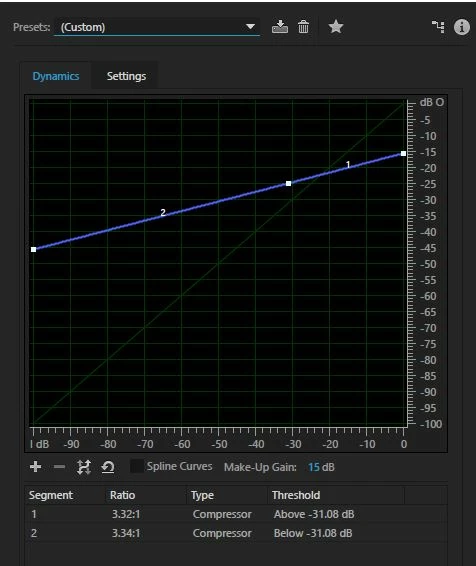
    The faint green slope represents 'normal' dynamics, and all I've done here is altered the blue line so that it ends at -15dB and starts at about -45dB, and it's still a straight line. This is a good starting point, but I should warn you that if you have the blue line much more level than this, the artifacts make most audio unlistenable. The result comes back with the signal up to the max level it started at, as it's been given 15dB of makeup gain.

    One important thing you should do to your file before running this though is to normalize it. The reason for this is that the effect is calibrated to run on a file where the peak level is 0dB, and that's what you should normalize to before running the effect, or the results will be completely unpredictable. Depending upon what it is you are trying to reduce the dynamic range of, you may need a slightly different slope, but this is probably a good starting point. HTH.

    1 reply

    SteveG_AudioMasters_
    Community Expert
    Community Expert
    September 27, 2017

    'Auto gain' is a bit of a nebulous expression - what exactly are you trying to achieve?

    Bill Crockett
    Inspiring
    September 28, 2017

    With a stereo wave file, I want to get full dynamic range.

    One wave editor states this in its auto gain:

    Normal recordings can have the volume of the recording too high in parts and too soft in parts. 'Automatic Gain Control' reduces the too loud parts and increases the too soft parts. This is sometimes a better alternative to normalization.

    Another editor states:

    Auto Gain evens out the volume to a consistent level across the selection.  Auto Gain automatically varies the volume level to increase it when it is low and decrease it when it is high.  This editor has Target volume, Update interval, attack/release, Maximum gain, Silence level.

    I experimented with Dynamics Processing, Multiband Compressor, Single Band Compressor, Gain Envelope, but there are too many  presets and I could not get the result.

    I can send wave file images of what they look like.

    Legend
    September 28, 2017

    "With a stereo wave file, I want to get full dynamic range"

    "Normal recordings can have the volume of the recording too high in parts and too soft in parts. 'Automatic Gain Control' reduces the too loud parts and increases the too soft parts. This is sometimes a better alternative to normalization."

    These two statements are somewhat contradictory, I think!  I assume you mean by "full dynamic range" the full range of the original recording, from its quietest to its loudest?  If so, and you follow the logic of the second quote, you will not achieve this because the process of your AutoGain will reduce the level of the loudest sounds and increase the level of the quietest.  Ergo, reduced dynamic range!