
Automate "volume inversion" in multitrack session
Hi,
I'm no expert in the world of Audition. So maybe there is a simple way to do the following instead of doing both tracks by hand:
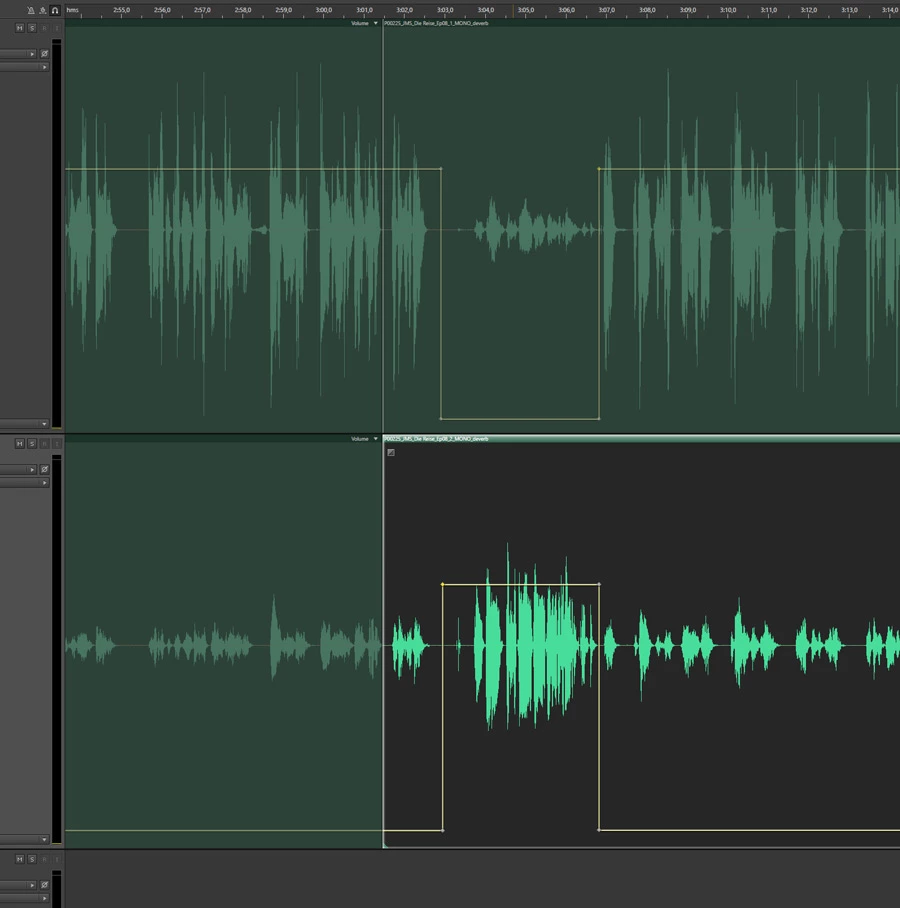
I have two voice tracks in a multitrack session. They are two voices of a dialogue recorded in a studio to two separate tracks.
Since the interlocuters were sitting opposite each other at the same table the mics naturally not only picked up the voice of the speaker but also faintly the voice of the second speaker. Above in the wave forms you see the result.
For character animator I need clean audio tracks with each track having its proper voice without any faint remnants of the other speaker.
So what I'm doing now is: I go through both tracks adjusting the volume by adding key points (see sample above). Since I have 7 hours of dialogie, I'm wondering if there is a faster way.
Is it possible to adjust the volume through key point data, then copy the data to the second track and invert it, so that "highs" become "lows" and vice versa?
Or is there a better way to go about it to begin with?
Thanks for any ideas or suggestions,
Johannes


 AdChoices