
nikbenki
Participant
October 27, 2017
Answered

Automation for internal effect-parameters

  • October 27, 2017
  • 2 replies
  • 1715 views

Hello, I do not often work with Audition but I saw that you can automate the Effect Mix parameter but I couldn't find an option to automate internal parameters of an effect. In my case, I wanted to automate the parameter "Decay Time" in the effect "Full Reverb". Is there a possibility to achieve that?

Nik Benki
    This topic has been closed for replies.
    Correct answer SteveG_AudioMasters_

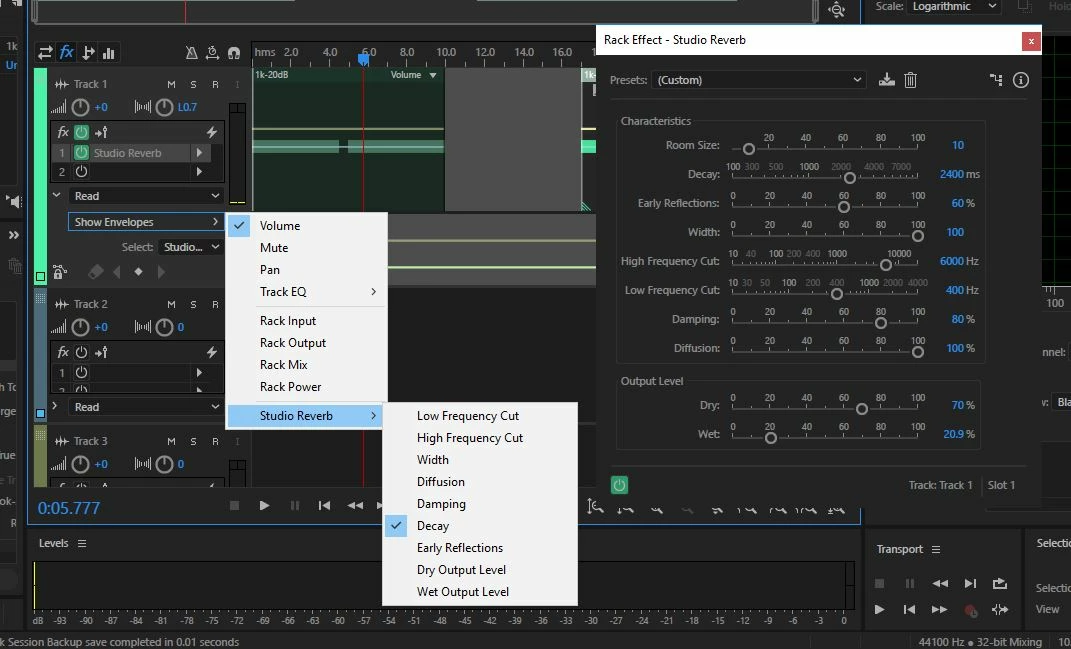
    You might have some difficulty with changing parameters in real time in Full Reverb, as it's rather processor-intensive. It will probably work fine with Studio reverb though. The method of accessing the rubber band is to use the twirl-down menus in the channel control panel:

    Start with the Read twirl-down, and then select Show Envelopes - it should be reasonably plain sailing from there (notwithstanding what I said about the suitability of the actual effect you've mentioned...)

    2 replies

    SteveG_AudioMasters_
    Community Expert
    SteveG_AudioMasters_Community ExpertCorrect answer
    Community Expert
    October 27, 2017

    You might have some difficulty with changing parameters in real time in Full Reverb, as it's rather processor-intensive. It will probably work fine with Studio reverb though. The method of accessing the rubber band is to use the twirl-down menus in the channel control panel:

    Start with the Read twirl-down, and then select Show Envelopes - it should be reasonably plain sailing from there (notwithstanding what I said about the suitability of the actual effect you've mentioned...)

    SteveG_AudioMasters_
    Community Expert
    Community Expert
    October 27, 2017

    Snap! (sort-of...)

    Bob Howes
    Inspiring
    October 28, 2017

    The cheat I often use if I want to "automate" something in Full Reverb is to make one version of the clip/track at the settings I want to start with and a second with settings I want to end with.  Then I just use volume envelopes to do a long slow fade between the two versions.

    Indeed, sometimes this can be quicker than creating and using Effect Envelopes even if it's something that would support that option.

    ryclark
    Participating Frequently
    October 27, 2017

    I don't think that you can. Because Full Reverb is a very processor intense effects plugin you can't actually adjust any of it's parameters in real time, they all have to be set before you start playback. You will see that if you playback audio with the Full Reverb settings panel open that all the settings get greyed out when playback starts. The only reverb effect that use real time automation for adjusting it's parameters is the much simpler Studio Reverb I'm afraid.