Participant
Jan 25, 2017 10:13 PM UTC
Answered

Bluetooth Headphones Not Working Properly with Adobe Products

Recently, I purchased some Skullcandy Uproar Bluetooth headphones. I like the idea that I don't have to be "tethered" to my computer while working on a project. The problem is when I open Audition, After Effects, and/or Premiere the audio changes and distorts.

After poking around on my Mac, I noticed while being in the Audio Midi Setup when I opened those applications the format would change from a clear "2ch 32-bit Float 44.1 kHz" output to "1ch 16-bit Integer 8.0kHz" output which sounds like I am listening through the handset of an older phone. If I tried to change back it to the 2ch it would revert back 1ch immediately.

I also asked a colleague who had to another brand of bluetooth headphones and a Mac to do the same thing, and his headphones acted the same way once he launched After Effects.

Is there anything I can do correct this problem so I can work with these programs without having to put on a new set of headphones and be tethered to my computer? 

This topic is closed to new replies. Start a new post to keep the conversation going.
RGvideo123
RGvideo123Correct answer
Participant
Mar 9, 2017 6:48 PM UTC

I Solved it!

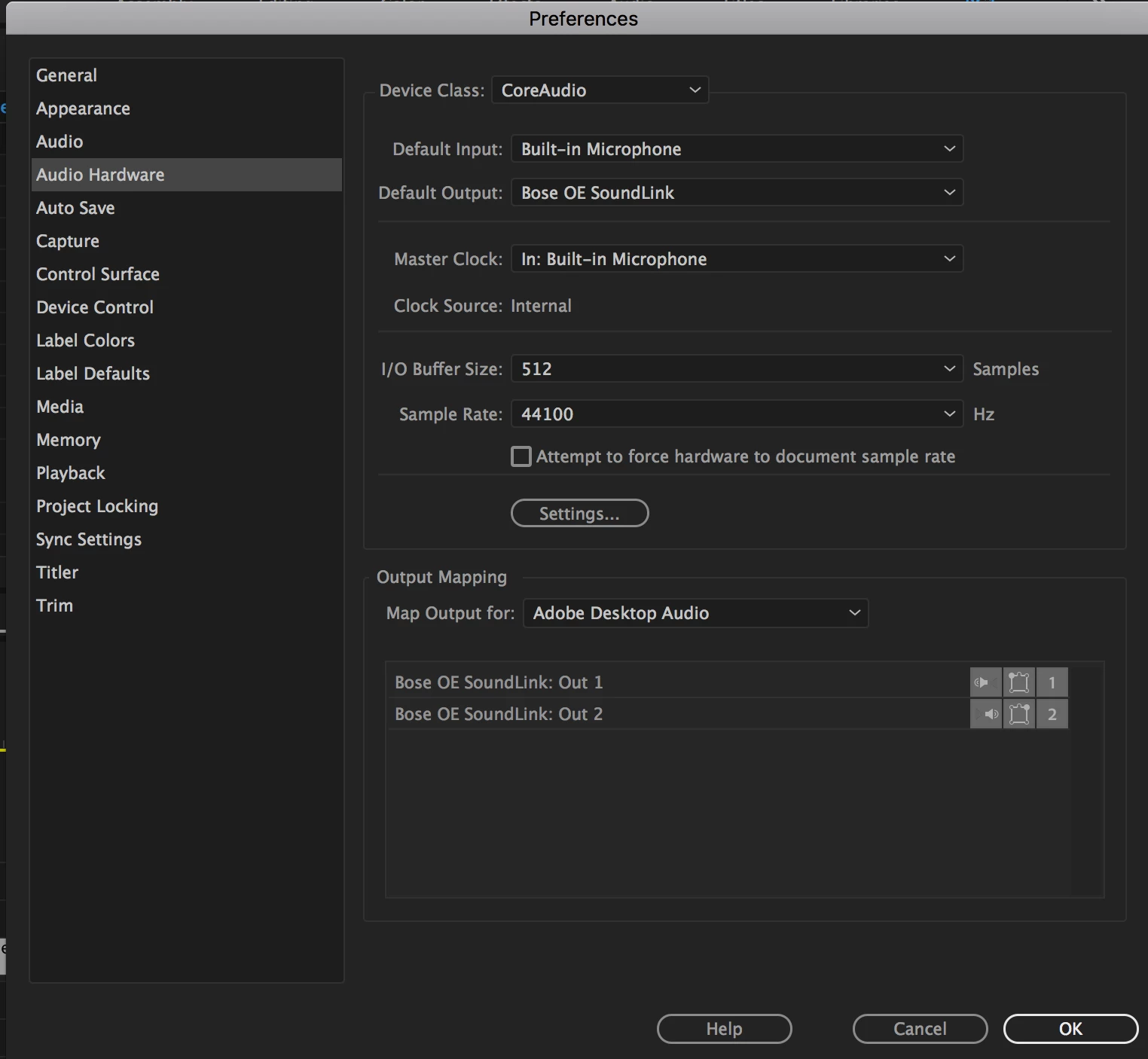
Preferences > Audio Hardware > Make sure your Default Input isn't the Bluetooth device.  Select "Bulit-in Microphone'.  > Default Output Select your Bluetooth Device.

17 replies

Participant
Mar 9, 2020 3:01 PM UTC

Oh my god. Thank you.

Translate
cassgoodluck
Participant
Oct 29, 2019 7:28 PM UTC

Thank you for this! after a lot of frustration with it constantly not working or sounding very good when it was technically working - I found this article and now it is completely perfectly working! thank you!!

Translate
tomm65680977
Participant
Jan 24, 2019 10:45 AM UTC

wow thanks a bunch! that had been bugging the heck out of me and its great to have a fix! many thanks bud!

Translate
Participant
Dec 28, 2017 3:09 PM UTC

This works!! Thank you!

Translate
Participant
Aug 11, 2017 7:47 PM UTC

The solutions above worked GREAT for me too!

Translate
RGvideo123
RGvideo123Correct answer
Participant
Mar 9, 2017 6:48 PM UTC

I Solved it!

Preferences > Audio Hardware > Make sure your Default Input isn't the Bluetooth device.  Select "Bulit-in Microphone'.  > Default Output Select your Bluetooth Device.

Translate
Participant
Mar 9, 2017 7:34 PM UTC

Great, that works! Thank you guy!

Translate
Participant
Feb 27, 2017 8:43 PM UTC

I have exactly the same problem with my "BRAGI - The Headphone" bluetooth headphones.

Do you have a reason?

Translate
ryclark
Participating Frequently
Jan 25, 2017 11:18 PM UTC

Can you listen to other audio from your Mac to the Bluetooth headset OK? If so what settings are shown in the computer's Audio MIDI Setup page? I would have thought that you would probably have to output audio as only 16bit from Audition in order to get the Bluetooth link to transmit it correctly.

Translate
Participant
Jan 26, 2017 1:43 PM UTC

Yes, ryclark​, other audio sources from the Mac while using the bluetooth headphones work and sound fine. I can manually change from the clear 2ch 32 bit float 44.1 kHz to the 1ch 16 bit interger 8.0 kHz without any Adobe products running, and it still sounds distorted and distant. Somehow I need to keep it from switching.

Translate
ryclark
Participating Frequently
Jan 26, 2017 4:28 PM UTC

Have you tried changing it manually from 2ch 32bit float 44.1kHz to 2ch 16bit 44.1kHz? It shouldn't switch anything if you have got your settings correct in both Audition and the Audio MIDI setup page.

Translate