
Inspiring
November 8, 2023
Answered

Bug? Or user error? with "automatic speech alignment" -- the resulting track isn't aligned at all.

  • November 8, 2023
  • 7 replies
  • 838 views

Does automatic speech alignement not work how I think it should work?  Am I using it wrong?  Or is there a bug?


I have an original, noisy, track.  I recorded ADR in segments for each bit of the track.  I looked online and learned that the best way to align them was with "automatic speech alignment" in Adobe Audition.


I followed the instructions here: https://www.youtube.com/watch?v=I660VJ2S_v0 although this appears to be for a slightly older version.


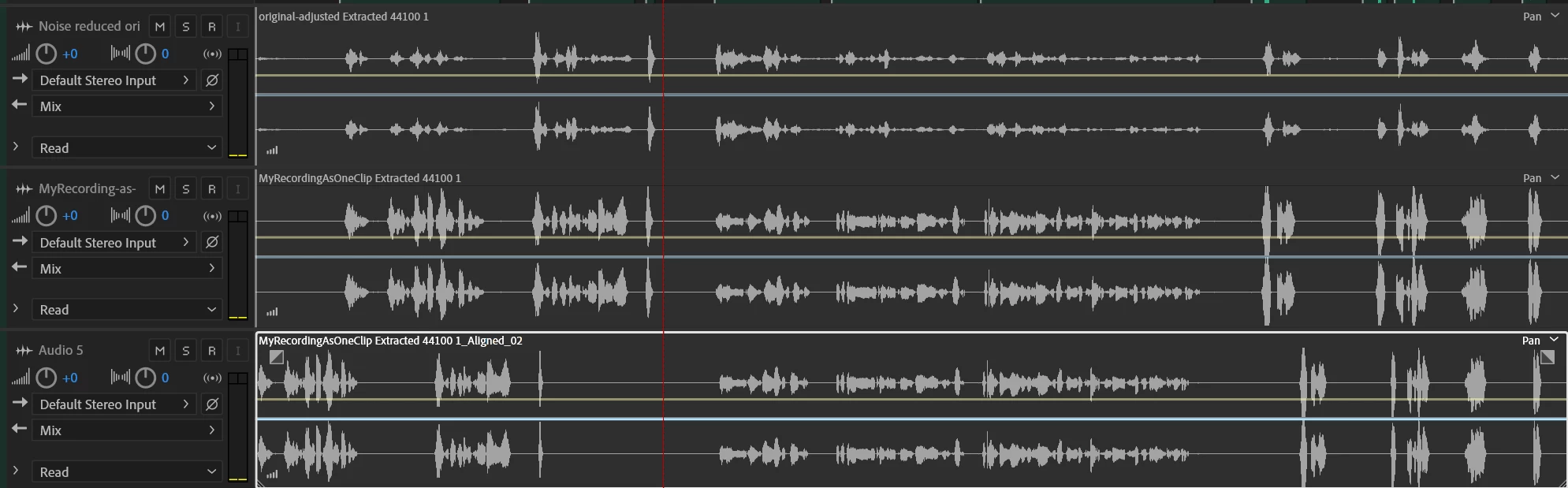
When I tell it to align the speech however, it doesn't appear to do anything close to that, it just takes my recording and spreads it out between the beginning and the end.  Nothing is actually "aligned" and because the segment starts out with some dead air, the resulting track is significantly less aligned than the original.

The top track here is the one I am aligning to. In this image, it's after I applied significant noise reduction to the original.  The original has the same problem.
The middle track is my ADR attempt.  I exported it as a single track, the same length as the original, since the slices didn't work at all.

The bottom track is the result of clip->Automatic Speech Alignment with the first two tracks selected.  Note how the speech begins way earlier than the dialog in either of the first two tracks, and how it ends about the same. When I listen to it, some of it sounds sped up, and other parts drawn out.


Is this a bug?  Am I doing something wrong? Thanks for any advice.


I am using Audition 24.0.0.46 (latest) and this is on Windows 
This topic has been closed for replies.
Correct answer SteveG_AudioMasters_

Okay, I've tried this with the audio from your videos. ADR isn't broken, but you are asking it to do a heck of a lot with a very noisy signal. If I try it with your audio as it stands, I get the same result you do. But...


I fed the original audio into Adobe's online Speech Enhancer (you can find this here ), whacked the processing up to 100% and downloaded the results. Replacing the original audio with the enhanced version doesn't give an absolutely perfect alignment at the end, although this could easily be fixed, but it does demonstrate that it's the noise that is the problem, rather than anything being inherently broken. I will upload the mixed result, which gives you a pretty good idea of how well it works - you should be able to hear it here. 

7 replies

SteveG_AudioMasters_
Community Expert
SteveG_AudioMasters_Community ExpertCorrect answer
Community Expert
November 9, 2023

Okay, I've tried this with the audio from your videos. ADR isn't broken, but you are asking it to do a heck of a lot with a very noisy signal. If I try it with your audio as it stands, I get the same result you do. But...


I fed the original audio into Adobe's online Speech Enhancer (you can find this here ), whacked the processing up to 100% and downloaded the results. Replacing the original audio with the enhanced version doesn't give an absolutely perfect alignment at the end, although this could easily be fixed, but it does demonstrate that it's the noise that is the problem, rather than anything being inherently broken. I will upload the mixed result, which gives you a pretty good idea of how well it works - you should be able to hear it here. 

Inspiring
November 9, 2023

I got similar terrible results after trying to remove all the noise using the "noise reduction" tools in the audio panel (that's the track you see in the original message) but I'll give the speech enhancer a try.  Thank you!  I didn't know about that tool!


SteveG_AudioMasters_
Community Expert
Community Expert
November 9, 2023

I should have mentioned that I tried the internal NR too - and it would work, but would take multiple passes to get anywhere close to the result you can achieve with the AI-assisted speech enhancer. That almost makes the original audio good enough to use!

Inspiring
November 9, 2023

Here's the original video with original audio:  https://youtu.be/1VNj6YnI5Ps?si=pnqoLLNGO6tdXYKO


Here's the replacement audio track: https://youtu.be/LwE5nne3j0U?si=qcOQx9iFwHNLSkVU


I'll delete these once I've resolved this issue.  Thanks for any help you can give!  Does it work properly for you?


I've tried it both as one little piece at a time, and as the whole thing as pictured in the original message, and the tool doesn't look like it's trying very hard at all.  I'm better off without it.

SteveG_AudioMasters_
Community Expert
Community Expert
November 8, 2023

If I can find some suitable material, I'll have a look...

Inspiring
November 8, 2023

The reason I did it as a full track is that, when I split it into sections and aligned each as closely as I could,

1. The tool only let me choose 2 items at a time, 1 to be the Reference and the other to be the Unaligned clip.  It's very tedious to do this for each phrase.

2. When I selected "add aligned clip to new track" then it put the new "aligned" clip back at the very start of the track -- not "aligned" at all, which defeats the purpose of the tool.  When I don't click that, I can't tell that it's done anything at all.

SteveG_AudioMasters_
Community Expert
Community Expert
November 8, 2023

I haven't tried it recently, but I don't think it's a bug - it may just be that the selections are out of compensation range. The thing to do there is try what Jason does - split it into sections and get each one as closely aligned as you can. If I get a chance I'll try it later and see how it's behaving.

Inspiring
November 8, 2023

Steve, thank you for the reply.  The video you linked has a user interface that looks like the one I'm using, but when I do the replacement following the steps in the video, nothing is properly aligned (see image above).  Any ideas as to what I could be doing wrong?  Or is this a bug?

SteveG_AudioMasters_
Community Expert
Community Expert
November 8, 2023

That was for a very early version of ADR. What you might find useful is Jason Levine's live stream coverage of how to do this - you'll find it here: