
Inspiring
Jan 15, 2020 4:49 PM UTC
Answered

BUG: Sending Media into Audition from Premiere Throws Two Identical Errors (Entry Point Not Found)

Sending media into Audition from Premiere Pro 2020 (right clicking on a clip in the sequence and hitting Edit In Adobe Audition) throws two identical error messages:
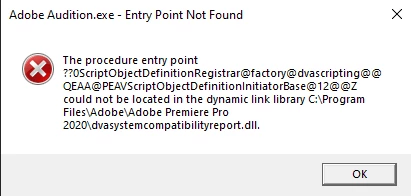


Only started happening once updated to version 13.0.2.35. Windows 10, fully up to date as of 1/15/2020


Please sound off in the comments if you're having the same issue

This topic is closed to new replies. Start a new post to keep the conversation going.
Charles VW
Charles VWCorrect answer
Inspiring
Jan 17, 2020 4:41 PM UTC

This should be resolved by updating Premiere Pro to 14.0.1 which went live last night.


The reason why this didn't show up in beta testing is that Au 13.0.2 and Pr 14.0.1 are from the same point in time, and Pr shipped later than Au. It did uncover an underlying issue that we'll still fix in Au, likely for Au 13.0.3 so this shouldn't happen if you're on an older version of Pr and a newer version of Au (or vice versa)

8 replies

Charles VW
Inspiring
Jan 16, 2020 2:25 AM UTC

As @_durin_ mentioned, we're looking into this. I haven't tried it yet, but you might try renaming dvasystemcompatibilityreport.dll to something else (it lives in the Premiere Pro folder). However, I don't know if PPRo will launch without it, it shouldn't be required. I'll try a few scenarios on my Windows machine in a bit.

Translate
Participant
Jan 16, 2020 9:43 PM UTC

Thanks for the suggestion. Let us know if it works.


It was a small incremental update (XX.0.2 from .0.1). Can't be that much code for Adobe to check.

I'm surprised this didn't appear in beta testing.

Translate
Charles VW
Charles VWCorrect answer
Inspiring
Jan 17, 2020 4:41 PM UTC

This should be resolved by updating Premiere Pro to 14.0.1 which went live last night.


The reason why this didn't show up in beta testing is that Au 13.0.2 and Pr 14.0.1 are from the same point in time, and Pr shipped later than Au. It did uncover an underlying issue that we'll still fix in Au, likely for Au 13.0.3 so this shouldn't happen if you're on an older version of Pr and a newer version of Au (or vice versa)

Translate
SteveG_AudioMasters_
Community Expert
Community Expert
Jan 15, 2020 6:37 PM UTC

I've just run the whole round trip without any issues at all on an up-to-date W10 laptop - did exactly the same as you did. The only thing I can suggest, as it appears to be a .dll issue is that you uninstall and reinstall Premiere - it's a Premiere .dll that appears to be malfunctioning.

Translate
TeeKayCCAuthor
Inspiring
Jan 15, 2020 8:40 PM UTC

Re-installed both. Tried installing Au before Pr. Cleared preferences too. Same error. Errors twice for every clip I try to import

Translate
SteveG_AudioMasters_
Community Expert
Community Expert
Jan 15, 2020 11:24 PM UTC

I'll see if I can point one of the devs at the thread.

Translate