
Participant
September 22, 2018
Question

Button to switch being sessions/files not working

  • September 22, 2018
  • 1 reply
  • 305 views

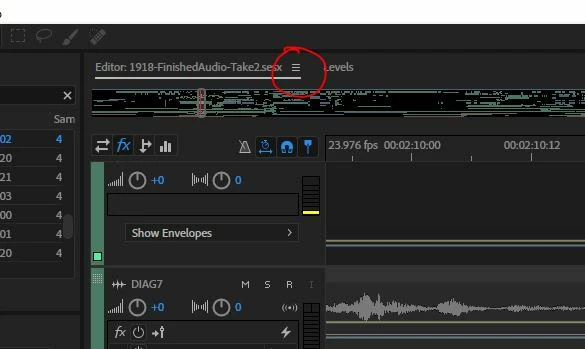
Am I losing it, or is this button with three horizontal bars supposed to be a dropdown that lets me switch between either open sessions (in Multitrack mode) or open waveforms (Waveform editor mode).

When I click on it, nothing happens.

I really don't want to have to reinstall the program (Adobe Audition CC 2018) because I'm in the middle of a project, but this is a huge PITA.
This topic has been closed for replies.

1 reply

SteveG_AudioMasters_
Community Expert
Community Expert
September 22, 2018

revisionfred  wrote

Am I losing it, or is this button with three horizontal bars supposed to be a dropdown that lets me switch between either open sessions (in Multitrack mode) or open waveforms (Waveform editor mode).

You're losing it! That's the panel control button - nothing to do with mode changes at all. All is not lost, though:

What you need to do is right-click just underneath the main menu at the top, and hit 'expand':

You should get the correct tabs back then:

Participant
September 22, 2018

Thanks Steve!

This is helpful but not actually what I was trying to solve for.

I think in previous versions of Adobe Audition, where that "grab" bar lives, it used to be a dropdown menu that let you switch between various sessions you had open.

Now either that feature is moved or removed completely. Hm.

- Fred

SteveG_AudioMasters_
Community Expert
Community Expert
September 22, 2018

revisionfred  wrote

I think in previous versions of Adobe Audition, where that "grab" bar lives, it used to be a dropdown menu that let you switch between various sessions you had open.

No, it's never done that. Having multiple sessions open is a relatively recent thing anyway. The only thing on the tool bar itself that let you select anything like that is at the other end, where you can select workspaces. If you want to swap between sessions, you have to go to the 'Files' panel, where you can select different sessions by clicking on them - the same way you can select different files in Waveform view.