

unauthorizedrob
Inspiring
November 25, 2018
Answered

Can I apply one effect to separate sections of a Waveform file at the same time?

  • November 25, 2018
  • 1 reply
  • 485 views

I am editing an audiobook in Audition CC2019 (almost done!).  I have a chapter where one character is too loud relative to the others.  I would LIKE to be able to go through the file and mark all the places where her voice appears, set a common level to each of these sections at one time, like with keyframes in the pitch effect.  Can't find anything on this in the User Guide.

Thanks!

Rob
    This topic has been closed for replies.
    Correct answer SteveG_AudioMasters_

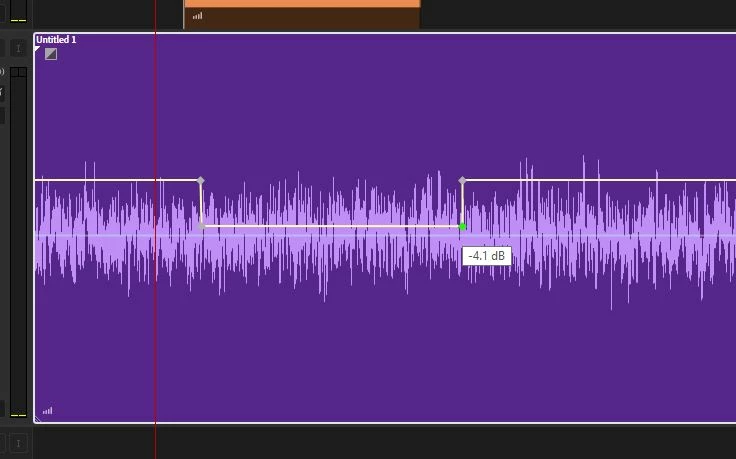
    You can't in Waveform view, but if you put your track into Multitrack view, then you can find each section, put rubber band markers at each end of it, plus a couple more (see screen grab below), and reduce the volume like that, and you can do this in as many places as you need to. When you're done, just mix down the file and you'll have the result you want. Make sure it's the yellow rubber band you use - the blue one is the pan control.

    1 reply

    SteveG_AudioMasters_
    Community Expert
    SteveG_AudioMasters_Community ExpertCorrect answer
    Community Expert
    November 26, 2018

    You can't in Waveform view, but if you put your track into Multitrack view, then you can find each section, put rubber band markers at each end of it, plus a couple more (see screen grab below), and reduce the volume like that, and you can do this in as many places as you need to. When you're done, just mix down the file and you'll have the result you want. Make sure it's the yellow rubber band you use - the blue one is the pan control.

    unauthorizedrob
    Inspiring
    November 26, 2018

    Thanks!