
Participant
January 25, 2019
Answered

Can I use batch process to extract specific channels?

  • January 25, 2019
  • 1 reply
  • 647 views

So I have some 32-channel files and my last batch processing step will be to save only the first 4 channels. I know that I could write some python script to do this outside Audition. But there are other operations that need to be done in Audition so I want to also put this last step in the one batch to make it simple.

When I do this by hand, I usually disable all other channels but the first 4,  right click->save to new, and manually save the new track with the 4 channels. However, this process cannot be recorded by 'favorites' so I don't know how to realize this with batch process. Is there any workaround? Thanks.
    This topic has been closed for replies.
    Correct answer SteveG_AudioMasters_

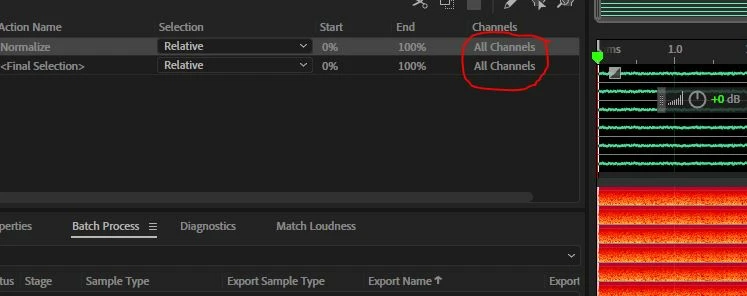
    Yes it would be useful, but as it stands I'm afraid you can't do it - except by the method you're already using - which is what I do with multichannel files to split them up. The problem is explicitly this:

    There appears to be no way that you can edit what it says in the Channels column, whatever you do. Which is a bit odd, and effectively makes it useless, as far as I can tell. Usually when I say something like this, somebody comes along to prove me wrong, and I'd be delighted if that happens, but I'm not holding my breath...

    1 reply

    SteveG_AudioMasters_
    Community Expert
    SteveG_AudioMasters_Community ExpertCorrect answer
    Community Expert
    January 25, 2019

    Yes it would be useful, but as it stands I'm afraid you can't do it - except by the method you're already using - which is what I do with multichannel files to split them up. The problem is explicitly this:

    There appears to be no way that you can edit what it says in the Channels column, whatever you do. Which is a bit odd, and effectively makes it useless, as far as I can tell. Usually when I say something like this, somebody comes along to prove me wrong, and I'd be delighted if that happens, but I'm not holding my breath...

    ryclark
    Participating Frequently
    January 26, 2019

    Here you go Steve. No you can't edit Channels but at least you seem to be able to record the selection. Although I don't think it will help the OP since file saving is not part of the Favorites simple scripting system.

    What we need now is a more complex custom output channel selection/level in the Convert Sample Type more akin to the Channel Mixer effect perhaps.

    P.S. The Channel selection is editable if you go to the Favorites.xml file where you can change it.

    SteveG_AudioMasters_
    Community Expert
    Community Expert
    January 26, 2019

    Yeah, it's a case of The Lord giveth, and The Lord taketh away... still can't do it though!