Participant
April 14, 2019
Answered

Can only use one microphone in Audition Multitrack view

  • April 14, 2019
  • 2 replies
  • 2148 views

Hello,

In Adobe Audition multitrack view, I'm trying to record my RODE NT-USB Microphone and Stereo Mix, but only my RODE microphone is showing up.

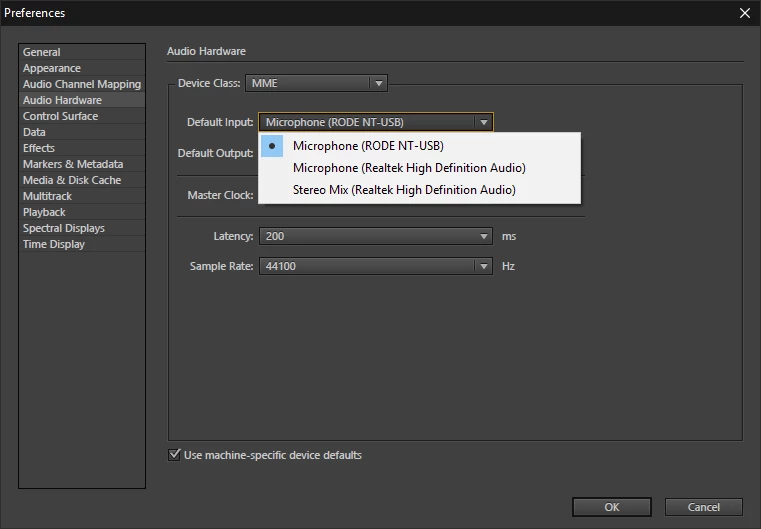
In the Audio Hardware settings, all of my microphones show up.

How can I get my Stereo Mix and RODE to record on two separate tracks?

    This topic has been closed for replies.
    Correct answer SteveG_AudioMasters_

    Still can't see Stereo Mix
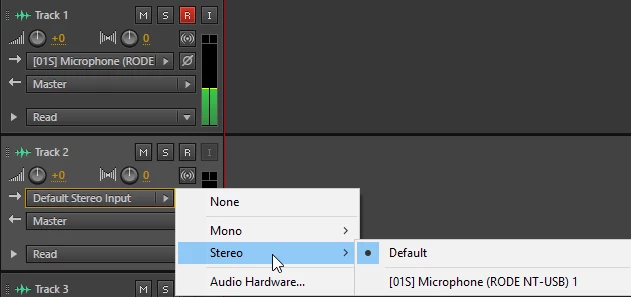

    It may well be that stereo mix as a recording source has been disabled by your laptop manufacturer. The RIAA have been banging on about being able to prevent people from doing this for years now, and in many cases they've been successful, despite there being any number of legitimate reasons for wanting to do this. You could try setting Stereo Mix as being the default input, but if it still doesn't appear as a source, then you'll have been externally nobbled - nothing to do with Audition, and it's not that rare any more either.

    There is technically a way around it using something called Virtual Audio Cable, but this is hard to set up. There are various other suggestions here as well: How to Record the Sound Coming From Your PC (Even Without Stereo Mix)

    2 replies

    Participant
    February 20, 2021

    You're problem is in the System Preferences.  I made a video on the a solution to this issue: https://youtu.be/qRHk77Jm3Is

    SteveG_AudioMasters_
    Community Expert
    Community Expert
    February 20, 2021

    You're nearly two years too late - and that's a Mac solution, which is completely different. And anyway, it's not the Rode that is the problem here - its What You Hear.


    May I suggest that you read posts carefully before adding to them years later?

    SteveG_AudioMasters_
    Community Expert
    Community Expert
    April 15, 2019

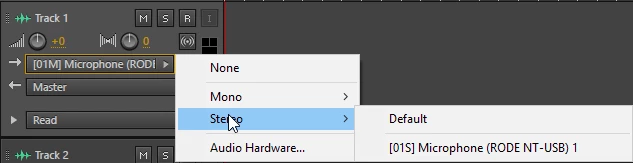
    Select one of them on one track, and the other one on another track? That's the way it usually works...

    SteveG_AudioMasters_
    Community Expert
    Community Expert
    April 15, 2019

    I should perhaps add that the 'default' settings are exactly what they say - but they are not the only option to select; you get everything that's available. All you have to do after selecting one input for each track is record-enable both of them, and you're good to go.

    TYPBAuthor
    Participant
    April 15, 2019

    Still can't see Stereo Mix