

tlmurray23
Inspiring
January 27, 2018
Answered

Can't drag window into position

  • January 27, 2018
  • 1 reply
  • 1855 views

I have a MacBook Pro and use an external monitor. Perhaps it was because the last time I used Audition I had a much larger external, but now, with my smaller external, the Audition screen is pushed up and left too far and I can grab the top and to drag it into position. I can pull out the external, whereupon Audition fits nicely on my Mac, but even when made small, when I plug the external in, Audition resumes its original position. The View and Window menus don't provide for a solution.  I am going through some plist files but it's taking forever . . . any ideas where the screen coordinates are located?
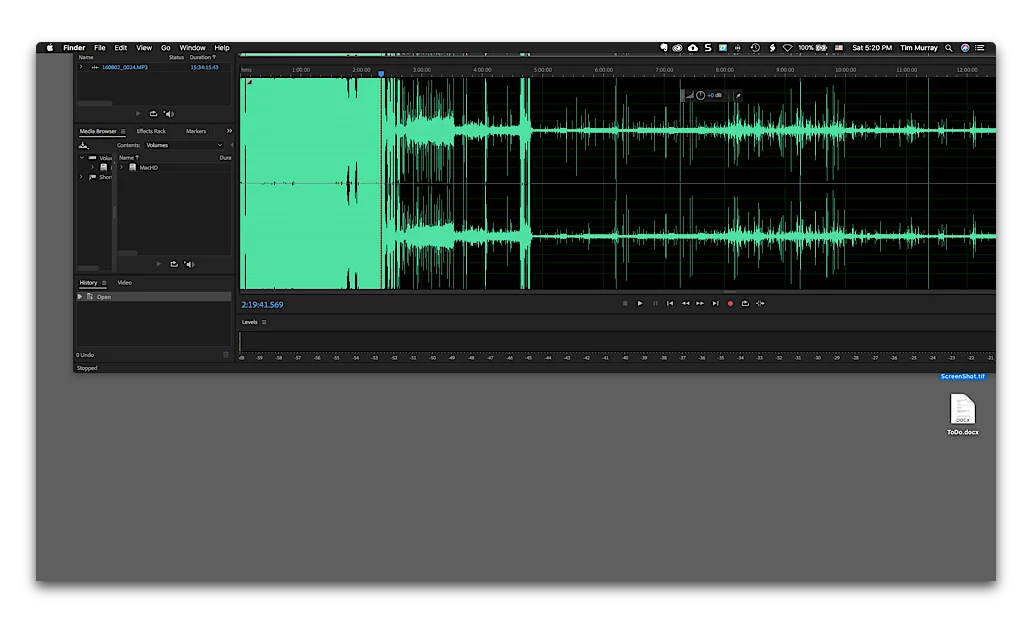
Adobe should provide for a menu option that pulls it into a usable position.

This topic has been closed for replies.
Correct answer Falk Oswald

Hi,

to reset the window position you can delete the workspace file from your preferences folder.

On Mac this is: /Users/[User_Name]/Library/Preferences/Adobe/Audition/[Version]/Workspace/WorkspaceManagerConfig.xml

On Windows: C:\Users\[User_Name]\AppData\Roaming\Adobe\Audition\[Version]\Workspace\WorkspaceManagerConfig.xml

However, this will reset the whole workspace configuration (i.e. active panels and arrangements).

Greetings,

Falk

1 reply

Falk OswaldCorrect answer
Participating Frequently
January 28, 2018

Hi,

to reset the window position you can delete the workspace file from your preferences folder.

On Mac this is: /Users/[User_Name]/Library/Preferences/Adobe/Audition/[Version]/Workspace/WorkspaceManagerConfig.xml

On Windows: C:\Users\[User_Name]\AppData\Roaming\Adobe\Audition\[Version]\Workspace\WorkspaceManagerConfig.xml

However, this will reset the whole workspace configuration (i.e. active panels and arrangements).

Greetings,

Falk

tlmurray23
Inspiring
January 28, 2018

Thanks, I used that file and changed the values of CurrentState, which are left, top, right, and bottom. Bingo!