



Participant
Jan 10, 2021 12:19 PM UTC
Answered

Can't Export Audio to file, absolute beginner

I have tried all the things mentions in other posts similar to this one


This topic is closed to new replies. Start a new post to keep the conversation going.
SteveG_AudioMasters_
SteveG_AudioMasters_Correct answer
Community Expert
Jan 10, 2021 12:59 PM UTC

I mixed two songs together and wanted to extract the end result from multitrack view into an mp3 file


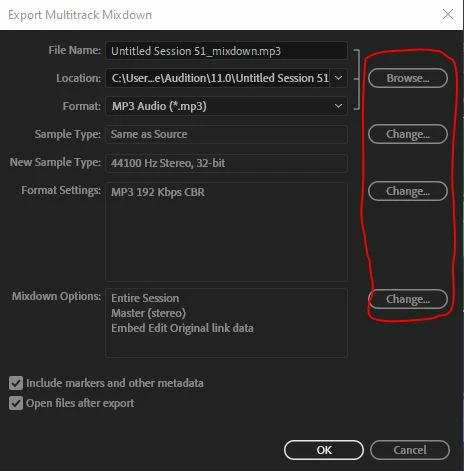
Export>Multitrack Mixdown>Entire Session and then use the Browse and Change buttons to alter the settings:
6 replies

SteveG_AudioMasters_
Community Expert
Community Expert
Jan 10, 2021 12:39 PM UTC

You have to explain in detail exactly what you're trying to do before we can be of any help at all, I'm afraid. So far you haven't told us anything, except that you are trying to do something that technically you can't do - you can only export audio as a file, not to one.

Translate
shady5E7CAuthor
Participant
Jan 10, 2021 12:42 PM UTC

i wanted to export as an mp3 file


Translate
SteveG_AudioMasters_
Community Expert
Community Expert
Jan 10, 2021 12:47 PM UTC

From Multitrack or Waveform view? And why do you want to export? If you are in Waveform view, then you should be using Save As.  Like I said, more details required.

Translate