
Participant
November 27, 2019
Question

Cannot chose connected devices input/output

  • November 27, 2019
  • 1 reply
  • 888 views

Hi

New to this program and this is driving me crazy atm.

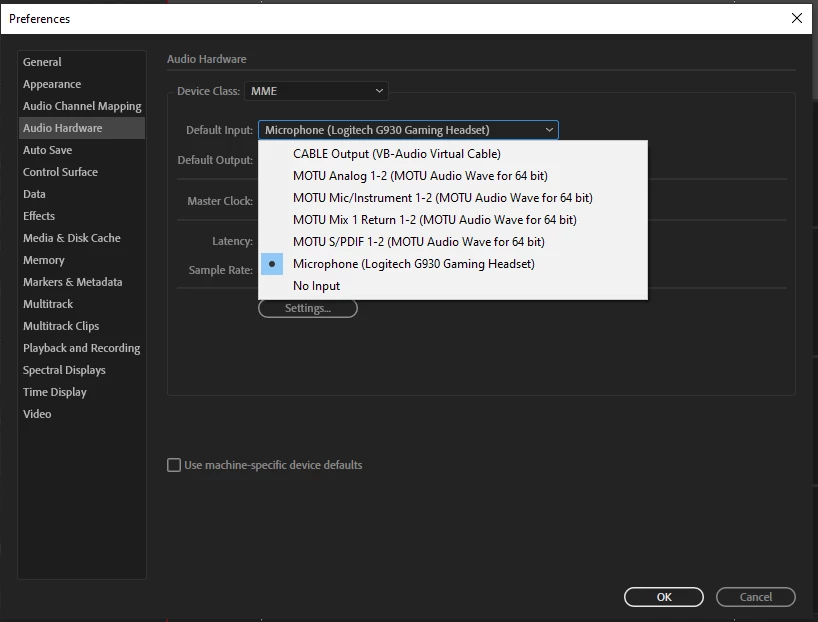
I have a Motu express interface as well as a virtual audio cable that shows up fine in the hardware section.

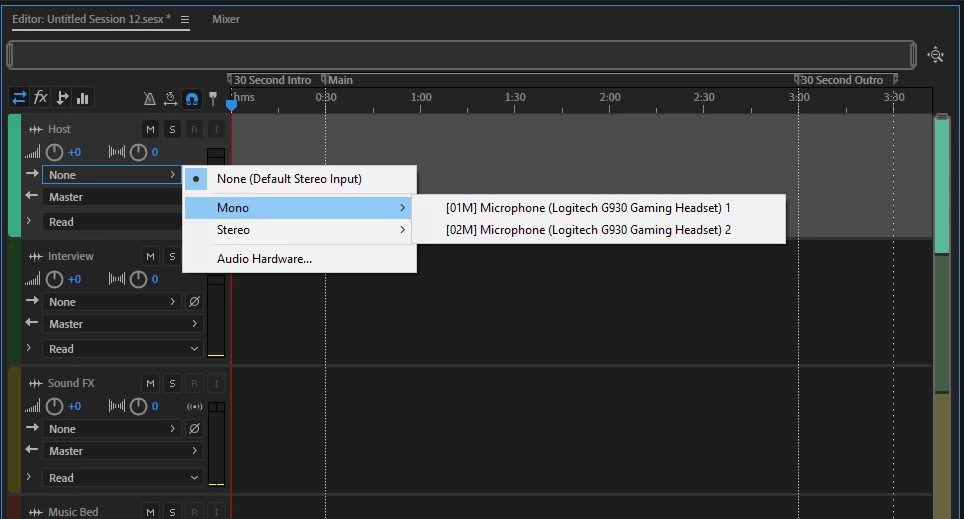
But when I try to chose the different inputs/outputs I can still only chose the defaults as in the second picture? This doesn't make any sense to me at all, if the program finds the different hardware, why is it not presenting me with the correct options?
Thnx

/Johan


This topic has been closed for replies.

1 reply

SteveG_AudioMasters_
Community Expert
Community Expert
November 27, 2019

This is mainly because you've picked the MME device class. If you pick ASIO, there's a good chance that the MOTU inputs will become available.

Participant
November 28, 2019

I am aware of the different driver types and I have tried both the ASIO drivers for the Motu card as well as ASIO4all driver. The results are the same however. All the devices I have plugged in are visible and found in the hardware section as in the first picture.

But when I try to chose those devices in the hardware mapping and/or in the input list it only gives me the option to set the devices that are considered default.


So no matter what driver I chose, the only input/output available are the Default and it doesn't make sense, all the devises should be available no?

SteveG_AudioMasters_
Community Expert
Community Expert
November 28, 2019

Are you saying that in your first screengrab, you cannot click on one of those other options and move the blue square with the dot at all?