
emmah96580892
Participant
April 16, 2018
Answered

Cannot resize Audition window or move to my second screen

  • April 16, 2018
  • 2 replies
  • 1159 views

I work with a laptop (Windows 10) connected to a second screen.  Whenever I try to move my Audition window to my second screen extension or try to resize it if working on the laptop alone, it crashes.  How do I stop it crashing and how can I set it up so that I can move it to my second screen.

Strangely it worked fine while it was a trial - as soon as I subscribed it's developed this glitch.

Thanks for your help.
This topic has been closed for replies.
Correct answer

Hi

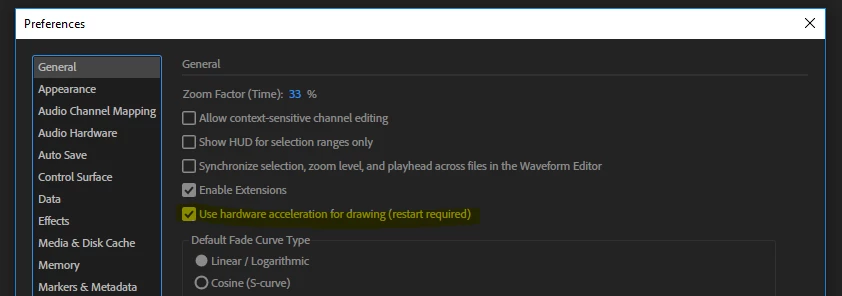
We will shortly provide an bugfix release for this issue, meanwhile please disable the hardware acceleration in the General preferences 

2 replies

Correct answer
April 17, 2018

Hi

We will shortly provide an bugfix release for this issue, meanwhile please disable the hardware acceleration in the General preferences 

emmah96580892
Participant
April 18, 2018

Thank you - this has solved the issue.

SteveG_AudioMasters_
Community Expert
Community Expert
April 16, 2018

The only thing I can suggest is to unload the whole thing, and reinstall. I have an identical setup here - Win 10 on a laptop with an external screen with the desktop extended onto it, which is definitely the way to go, rather than the 'show only' options. Works absolutely fine like that, and always has, so I can only think that something strange has happened during the authentication process on yours.