
Participant
April 25, 2017
Question

Cant link media (Premiere CC to Audition CC)

  • April 25, 2017
  • 3 replies
  • 1991 views

Hi,

i work in studio of editors for commercials and lately we started to work also with Audition CC

now, we trying to do  a round trip from premiere CC to Audition CC

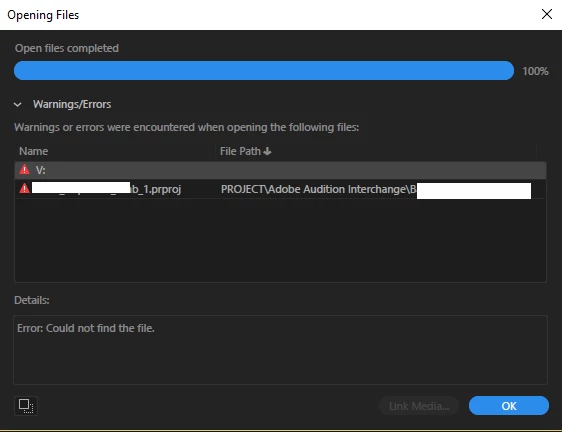
when I press Edit in adobe audition I have no problem. and then the Audition gets open and I get the message that it Could not find the file.

the "link media" is gray... no matter what i try it's not working.

the problem repeats in all the company users 😕😕

can somone help? 
 

This topic has been closed for replies.

3 replies

Participating Frequently
February 16, 2020

This is happening in 2020 too now, I don't know what the reason is but I figured that changing the file name or the location or both kind of fixes the issue.


PC USER

SteveG_AudioMasters_
Community Expert
Community Expert
February 16, 2020

How well this works - or even whether it works or not - depends upon several things. In no particular order, they are:


1) whether it's a Mac or a PC you are using. The current release of Catalina has apparently 'hardened' security, making it difficult or impossible to open or transfer files directly from any external drive. This is obviously a major issue, and is being worked on, and affects a number of Adobe products. If you experience anything similar with Windows, it's probably got something to do with the length of file names. I have no personal experience of this - it's just what I've been told by the developers, and a number of end-users.


2) Another thing that will severely limit correct behaviour, or even prevent it, is that you are not trying to transfer files between concurrent releases of both Audition and Premiere - at any given time, both must be up to date.


3) The other slightly more tangential issue with this, and this doesn't just affect the round-trip performance, relates to network use. Even if everything's working perfectly, the one thing that is very likely to fail is any sort of direct save across  a network; saving to a local disk and then transferring the file is far more likely to succeed, as the network is only handshaking with the OS, rather than with the OS and the app.


A lot of people seem to think that Adobe is rather dragging its feet about fixing the current issue with Catalina, and I can understand that. That said, you have to be aware of a couple of things; firstly that Adobe didn't cause this problem, Apple did, and apparently it wasn't expected. The development teams plan programs of work ahead, and when something like this happens, they have to drop what they're doing and try to fix it somehow - across a number of products, and probably in conjunction with Apple as well - all of which causes delays. Because it's a security issue, they are having to take extra care, and try to cover a multitude of different scenarios. And I'm sure that there are other issues as well. I'm not trying to apologise for them - I'm just pointing out that there may be more things in heaven and earth than are dreamed of in some peoples' philosophies... (with apologies to the Bard, and if you are called Horatio, don't take it personally!)

Participant
January 22, 2020

Hi
A colleague suggested this workaround, and it works.

In Premiere, Right click on video/audio clip and pick 'Edit clip in Adobe Audition'.

This creates the 'Extracted' audio file in the relevant directory (i.e. where your original clip is located on your PC/Mac)
Next, open Audition and load the 'Extracted' file, and make necessary edits. Then save the file.
This updates the Extracted file, and also updates the file in Premiere.

Hope this helps.

Participant
January 22, 2020

Having exactly the same issue.

Can't belive that there has been no solution provided by Adobe for nearly 3 years!!

How frustrating 😞