galanel33794006
Participant
October 13, 2021
Answered

Center channel extractor... Help!

  • October 13, 2021
  • 1 reply
  • 1757 views

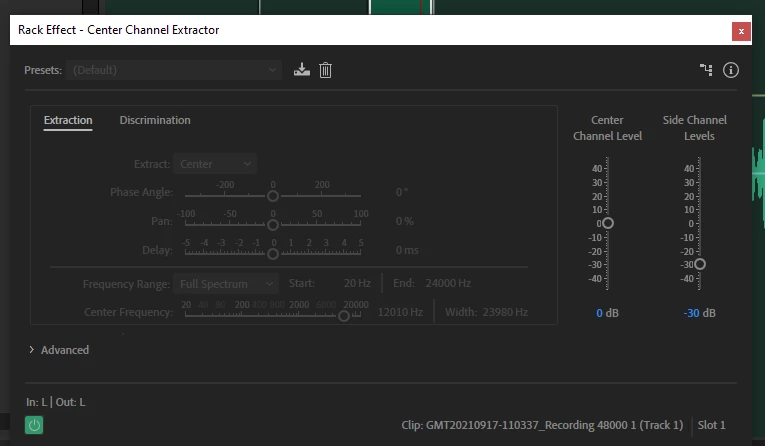
Why does my center channel extrator look like this?? I'm unable to change or edit the preset.

Correct answer SteveG_AudioMasters_

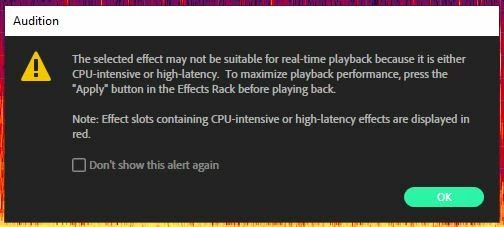
This happens because you have either ignored or dismissed the warning that comes up if you put processor-intensive effects into the effects rack, where this particular effect will show up as a red entry: What you should have seen and heeded was this:

Essentially, this is a 'process' effect and not meant to be applied in the Effects Rack at all; it's a process that you need to do with care, and independently. If you tell me that it shouldn't be allowed in the rack at all on that basis, I'd have to agree with you that almost certainly, it shouldn't be.

1 reply

SteveG_AudioMasters_
Community Expert
SteveG_AudioMasters_Community ExpertCorrect answer
Community Expert
October 13, 2021

This happens because you have either ignored or dismissed the warning that comes up if you put processor-intensive effects into the effects rack, where this particular effect will show up as a red entry: What you should have seen and heeded was this:

Essentially, this is a 'process' effect and not meant to be applied in the Effects Rack at all; it's a process that you need to do with care, and independently. If you tell me that it shouldn't be allowed in the rack at all on that basis, I'd have to agree with you that almost certainly, it shouldn't be.

galanel33794006
Participant
October 13, 2021

I see! Thanks Steve. Can you explain where/how I can use it then, if not in the effects rack? I'm afraid I don't understand what a "process" effect is.