Answered
Change Volume curves order
Can be order of applying to track Volume curves and effects rack changed? Which one is default? Curves goes first?


Can be order of applying to track Volume curves and effects rack changed? Which one is default? Curves goes first?
Track volume comes last, as a rule. If you look at the Mixer panel, the signal flow is from top to bottom, but at the top of the fx section there is a little box that I've put a red circle round:
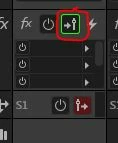
And if you click on that it will turn red, and the arrow moves to the right. When you do that, effects are applied after the fader. Sometimes this is useful, but not very often. The same thing applies to the Sends that you can see at the bottom of the screen-grab. By default they are set to be post-fader, but you can alter this as well by clicking on the button.
Already have an account? Login
No account yet? Create an account
Enter your E-mail address. We'll send you an e-mail with instructions to reset your password.


 AdChoices