
Choppy and Echoing Audio When I Try to Record
I have a Lenovo IdeaPad, Gaming 3 13IMH06 running Audition CC version 22.5. When I try to record through my CAD u37 I get choppy and echoing audio. I get the same results when I try to record using the laptop’s onboard mic. But when I record audio with my CAD mic on other applications, such as Audacity, it records fine. The CAD also records fine into Audition on my work machine. I’m running Windows 10 Version 21H2. Here is a screen shot of my hardware settings for Audition:
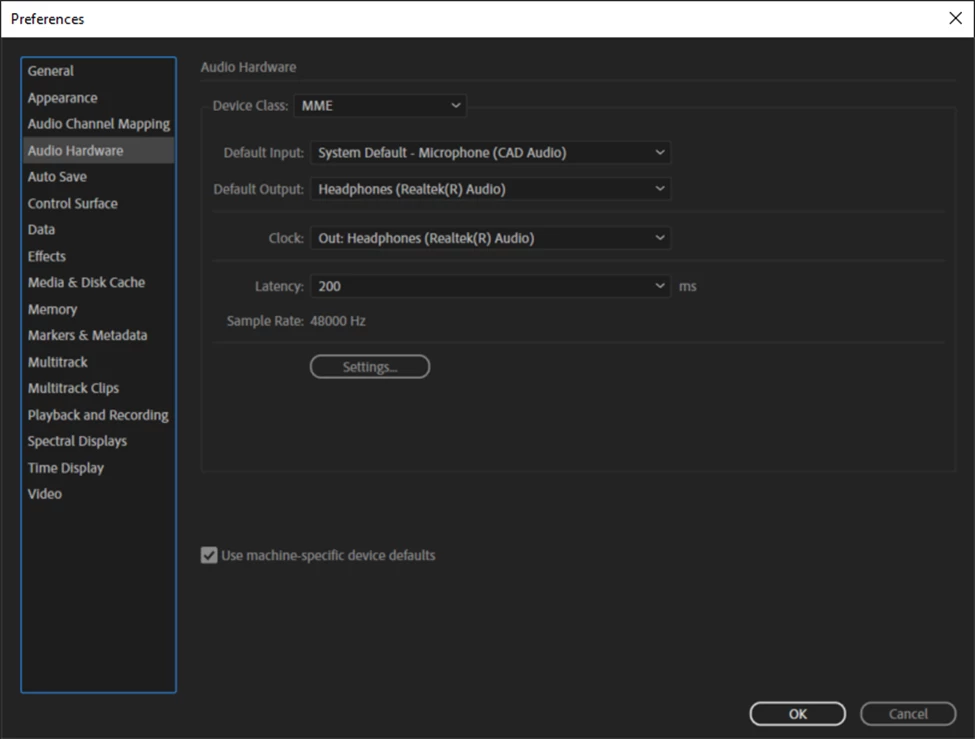
I updated my sound card drivers, and uninstalled and reinstalled Audition and still the same results. Any ideas as to what I can do to fix this? I have attached a sample of the audio I'm getting when I try to record.
This looks like the same problem this poster is having: https://community.adobe.com/t5/audition-discussions/robotic-echoing-playback/m-p/12881064#M32339


 AdChoices