
Participating Frequently
December 26, 2020
Answered

Clicks and pops in playback when effects are turned on??

  • December 26, 2020
  • 1 reply
  • 1640 views

Hey everyone! 

So im very new to audition and so far I love love love it. But im coming across a very frustrating issue where I hear random click and pops during playback. I did do research before posting here and know that it could be harware or update related (cables etc)  and will attempt all those fixes the next time I have the chance, but im currently more concerned with the current project as its already been recorded and I really dont want to lose it. Here is what I know so far...


-The clicking is totally random, happens ALL over the recording, and even changes drastically (like the same clip will have no pops and then a bunch the next time I listen)

-The clicking only occurs in the multi-track session of a recording and not in the waveform so the newer Declicker feature cant seem to fix the problem (in fact it seemed to get worse)

-The clicking seems to be irradicated and/or happens MUCH less when the effects are turned off. Which is great except for without the effects then the project is useless.


Any help to save this project would be GREATLY appreciated. And thanks in advance.
This topic has been closed for replies.
Correct answer SteveG_AudioMasters_

f it's random and all over the place, and apparently doesn't always occur in the same place when you replay the session, this is most likely to be either a HD streaming issue, or simply a processing overload, and you'll never be able to declick it or anything like that - in fact attempting to do this will probably make things worse, not better, because you will be introducing even more processing! So it's the exact opposite of what you should be doing.


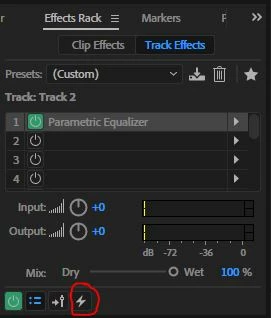
The first thing to try is rendering tracks. At the top of the track effects for each track is a small lightning bolt symbol. Activating this will pre-process all of the effects on your track so that they've been applied before attempting to stream playback. It's important to note that you can unclick this at any time if you wish to alter anything, so you're not committing yourself by doing this. If you do this to any track with significant effects on it, you will improve the situation with continuous playback significantly.


Give that a go first and see if it improves things.


I

This is the symbol you're looking for...

1 reply

SteveG_AudioMasters_
Community Expert
SteveG_AudioMasters_Community ExpertCorrect answer
Community Expert
December 26, 2020

f it's random and all over the place, and apparently doesn't always occur in the same place when you replay the session, this is most likely to be either a HD streaming issue, or simply a processing overload, and you'll never be able to declick it or anything like that - in fact attempting to do this will probably make things worse, not better, because you will be introducing even more processing! So it's the exact opposite of what you should be doing.


The first thing to try is rendering tracks. At the top of the track effects for each track is a small lightning bolt symbol. Activating this will pre-process all of the effects on your track so that they've been applied before attempting to stream playback. It's important to note that you can unclick this at any time if you wish to alter anything, so you're not committing yourself by doing this. If you do this to any track with significant effects on it, you will improve the situation with continuous playback significantly.


Give that a go first and see if it improves things.


I

This is the symbol you're looking for...

Participating Frequently
December 26, 2020

Thank you for such a quick response. Tried that and unfortunately it didnt change anything...