
Participant
August 22, 2018
Answered

Continue to record even if you are viewing automatic notifications

  • August 22, 2018
  • 1 reply
  • 295 views

Hello everyone, I would like to solve a problem that has been bothering me for decades ... When I start a recording, if I click the mouse out of the audition window or automatic notifications appear (update the virus definitions, make a backup etc.) the registration is blocked; this is a problem because when I register my band, more than once, having to throw away all the work done because of this problem ...

I also created a video on youtube (in Italian) to better understand what I'm asking for https://www.youtube.com/watch?v=pjdu2z17tME

Many thanks in advance...
    This topic has been closed for replies.
    Correct answer SteveG_AudioMasters_

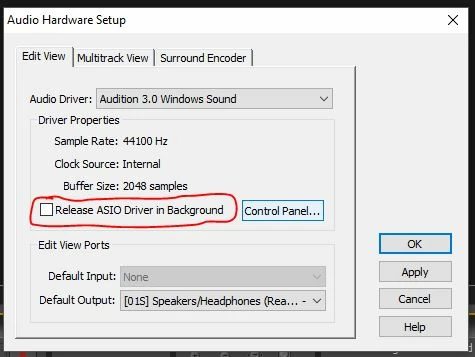
    You appear to be using Audition 3. In Audition 3 there is an option that alters this behaviour:

    If there is a check in this box, then you need to remove it, and Audition will carry on recording in the background. There is a similar option in the Multitrack view tab as well, if you are recording in that view.

    1 reply

    SteveG_AudioMasters_
    Community Expert
    SteveG_AudioMasters_Community ExpertCorrect answer
    Community Expert
    August 22, 2018

    You appear to be using Audition 3. In Audition 3 there is an option that alters this behaviour:

    If there is a check in this box, then you need to remove it, and Audition will carry on recording in the background. There is a similar option in the Multitrack view tab as well, if you are recording in that view.

    gigioberaAuthor
    Participant
    August 22, 2018

    I LOVE YOU!!!!!!!!!!!!!