


Legend
June 8, 2020
Answered

Control " K " Slicing Video and Audio Together

  • June 8, 2020
  • 2 replies
  • 898 views

Hello Everyone.

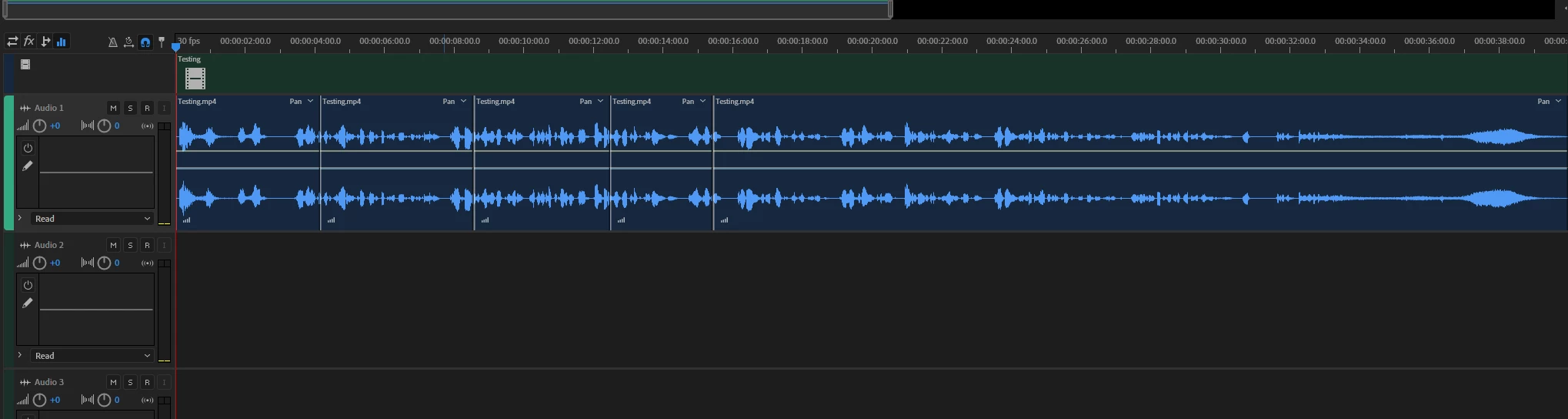
I Imported a Sequence from Premier To Audition. I can easily use the Razor Tool, or Clik on Control+K to Trim. I noticed It only Trims the Audio, not the Movie. I am not trying to do my Video Editing In Audition, but I just want to know If you can Slice or Cut the Video and Audio Together?

Thanks.
This topic has been closed for replies.
Correct answer SteveG_AudioMasters_

No you can't - because that would be trying to do your video editing in Audition, wouldn't it? 😉


It used to be possible, back in the days when it was also possible to resave your video and audio edit in Audition (if the video was just a cut, anyway), but as a matter of principle the demarkation is now strictly observed, and if you want to reassemble a movie that you've altered the audio on, you have to use Media Encoder. And Audition only supports video playback.

2 replies

Legend
June 8, 2020

Simple answer: No.


Audition essentially "separates" the audio from the video when your file is imported.  Any changes made to the audio do not affect the video in any way.  Once your "audio editing" is complete you have to replace the "old" audio and  "remux" your new audio file with the video to produce a single, combined audio and video file.


HTH

SteveG_AudioMasters_
Community Expert
SteveG_AudioMasters_Community ExpertCorrect answer
Community Expert
June 8, 2020

No you can't - because that would be trying to do your video editing in Audition, wouldn't it? 😉


It used to be possible, back in the days when it was also possible to resave your video and audio edit in Audition (if the video was just a cut, anyway), but as a matter of principle the demarkation is now strictly observed, and if you want to reassemble a movie that you've altered the audio on, you have to use Media Encoder. And Audition only supports video playback.

Legend
June 13, 2020

Thank you very much.
