
Creating A Shortcut Just to Open a 3rd-Party VST Plugin Effect Screen?
I just installed a 3rd-party VST effect bundle - Accusonus ERA. I am using these tools quite a lot, but in order to access them, I have to go through multiple layers of directories in the Effect menu. For example, I open the Effect dropdown. Then I hover over "VST," they I hover over "Restoration," then I hover over "Accusonus," then I hover over the actual effect I want to open it. That's pretty darned involved and takes up precious time.
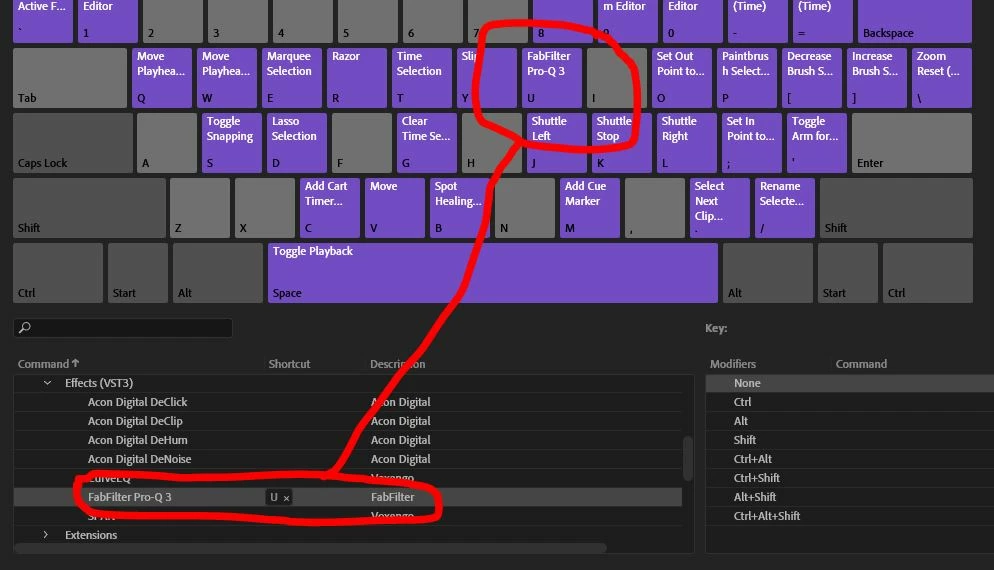
Is there a way I can set up a shortcut to go straight into the Accusonus folder and see all those tools? Or maybe to actually just open the ERA Noise Remover, for example. I don't want to APPLY the effect via a shortcut (as each file will often need different treatment). So "Recording" a FAvorite wound't work. But I'd love to be able to just directly open either the main Accusonus folder to see the tools, and then click on one, or to have a different shortcut for each of the 6 ERA tools. Is this do-able?
Thanks!
Ken


 AdChoices