

Zizipicoleo
Participant
April 2, 2020
Answered

Creating multichannel audio file from 3 mono files

  • April 2, 2020
  • 1 reply
  • 1669 views

Dear all,

I have 3 mono files that I would like to combine into one multichannel file. I thought this would be rather easy, but so far I have not been able to find how to do it. I have tried creating a new, blank 5.1 audio file, but I cannot drag and drop the mono channels into the channels of this file. No success using multitrack sessions either; each channel always has its own track and I cannot figure out how to export/mix the tracks into a single file with 3 channels. Am I overlooking something really obvious here? Hopefully someone can help me out, many thanks in advance!!
Cheers
This topic has been closed for replies.
Correct answer SteveG_AudioMasters_

I think it's really obvious, and easy, but if it isn't something you do regularly, you might not...


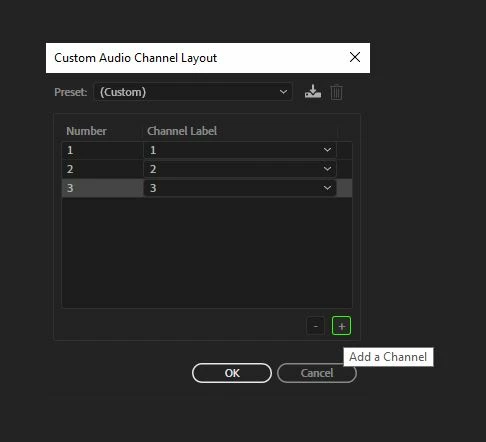
File>New>Audio File and select Custom. Pick mono, and then add a couple more mono tracks:

You can save that as a preset if you want.


You will now have a blank three-channel file, with channel on and off buttons on the RHS marked 1 2 3 (unless you gave them different names). By default, they are all turned on. Open your three mono files and with each one, copy it. Now go back to your 3-channel file and turn off the channels you don't want it in (so that would be two of them) and paste. You will now have your mono file in one of the channels. Repeat for the other two, turn all the channels back on, and save the result. You're done.

1 reply

SteveG_AudioMasters_
Community Expert
SteveG_AudioMasters_Community ExpertCorrect answer
Community Expert
April 2, 2020

I think it's really obvious, and easy, but if it isn't something you do regularly, you might not...


File>New>Audio File and select Custom. Pick mono, and then add a couple more mono tracks:

You can save that as a preset if you want.


You will now have a blank three-channel file, with channel on and off buttons on the RHS marked 1 2 3 (unless you gave them different names). By default, they are all turned on. Open your three mono files and with each one, copy it. Now go back to your 3-channel file and turn off the channels you don't want it in (so that would be two of them) and paste. You will now have your mono file in one of the channels. Repeat for the other two, turn all the channels back on, and save the result. You're done.

Zizipicoleo
Participant
April 2, 2020

Dear Steve,

Thanks so much!! That was indeed very easy. I had actually tried something similar earlier as well, but I did not think of disabling 2 of the 3 channels when copying. Slightly embarassed now, haha.

Many thanks again!
Cheers