
LaSalamander
Inspiring
March 26, 2021
Question

Crossfade default: symmetrical vs. asymmetrical

  • March 26, 2021
  • 2 replies
  • 658 views

So, it used to be that in Multitrack Editor, when you crossfaded two clips, it would be Asymmetrical by default:
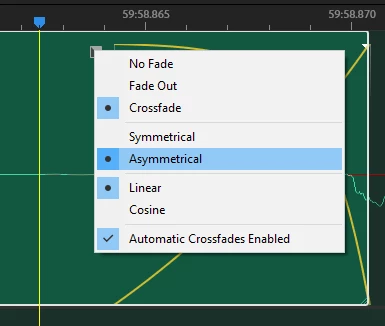
 

I loved that. That's usually what you (or at least I) want. Now (as of the latest update, I think), it's always Symmetrical and I have to switch it back every single time. Is there a way to set the default back to Asymmetrical? If so, I cannot find it!

This topic has been closed for replies.

2 replies

LaSalamander
Inspiring
August 15, 2021

But guys, this is all fixed now! the restored to "Asymmetrical" by default. Hurray!

SteveG_AudioMasters_
Community Expert
Community Expert
March 26, 2021

Doesn't work like that. I'm reasonably confident that it's stored as part of the session file information, so if you change it and save the result, it will remain in whatever setting you chose for that session. If you open a different session where you had the other option set, then that's how it would open. I've tried that here on the current version and it seems to work fine.

LaSalamander
Inspiring
May 1, 2021

Man, I so wish that were true for me. Just now, to test it, I opened Audition (version 14), crated a brand new multitrack  session from a template, imported a random WAV file, cut it in two pieces, dragged one on top of the other for an automatic crossfade, and it's defaulted Symmetical:


I just did the exact same thing in version 12 and it's defaulted Asymmetrical:


How can this be?!

SteveG_AudioMasters_
Community Expert
Community Expert
May 1, 2021

As far as the current version goes, the above information is almost correct - it's definitely saved as part of the session information, but you can set individual fades to be different. What you can't do is alter the defaults, I'm afraid.