
Customising the default labels associated with cues/markers
Hi everyone
I am using Audition 3.0 to have a large number of audio files annotated with two different types of markers (corresponding to two different types of events) inserted by human listeners at certain time points that they see fit. The nature of the task requires listeners to insert these markers as they listen (on the fly); it is not possible to rewind a piece or to listen to it a second time.
I have defined the keys A and Z to insert two different types of cues/markers: index markers and track markers. These show up in the horizontal bar above the waveform and can be subsequently renamed from the Cue List; the attached screenshot shows two markers renamed and two others with their original names, namely "Marker nn (idx)" and "Marker nn (trk)".
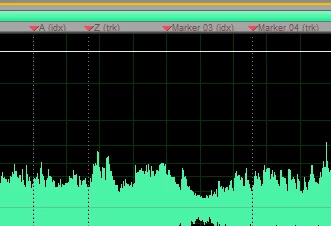
My question is: is there any way to customise the default label associated with each marker type, such that for instance, instead of "Marker 01 (idx)", "Marker 02 (idx)", .., the labels that appear upon each button press are instead e.g. "A1", "A2", .. ? That is, to eliminate the need for these renamings to be done manually, after the annotations are done?
Many thanks in advance for any help!

 AdChoices