



Dashed vertical line in Audition "cutting" audio clips from Zoom H5 recording
Hi Everyone!
After importing some two channelled interviews from a Zoom H5 recording device into Audition, the appears dashed lines in the clipp, seemingly erratically "cutting" the clip (see below)
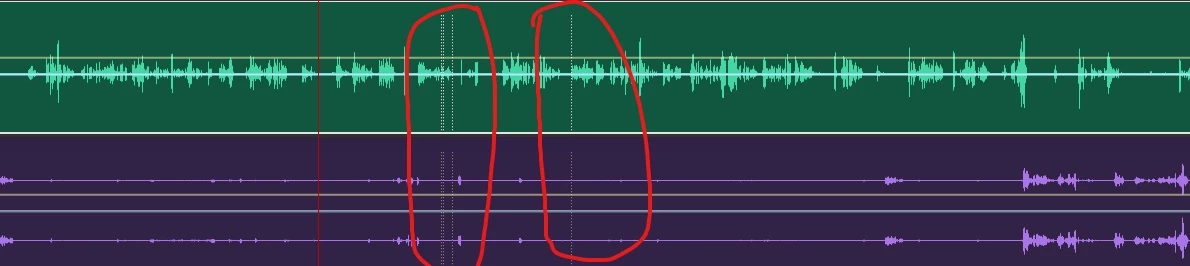
. The interviewee begins a sentence and it is cut at these specific places, but without be ever having pressed the pause button, or any other related to the recording. From what I have been able to abduce, the "cutting" happens when I higher and lower the volume for my headphone/listening output on the Zoom device.Though, it does not appear to be this every time. During the last interview, I tried being extra careful as not to accidentially press any other button, but the issue still appeared. Is this some form of function that I have missed, or does anyone have any suggestions as to what is going on? And, can the "cutout" data be recovered in any way?
Any suggestions are much appreciated, thank you in advance!
Kind regards,
Viktor Aronsson
 AdChoices