
Participant
September 12, 2017
Answered

data difference after save
  • September 12, 2017
  • 1 reply
  • 291 views

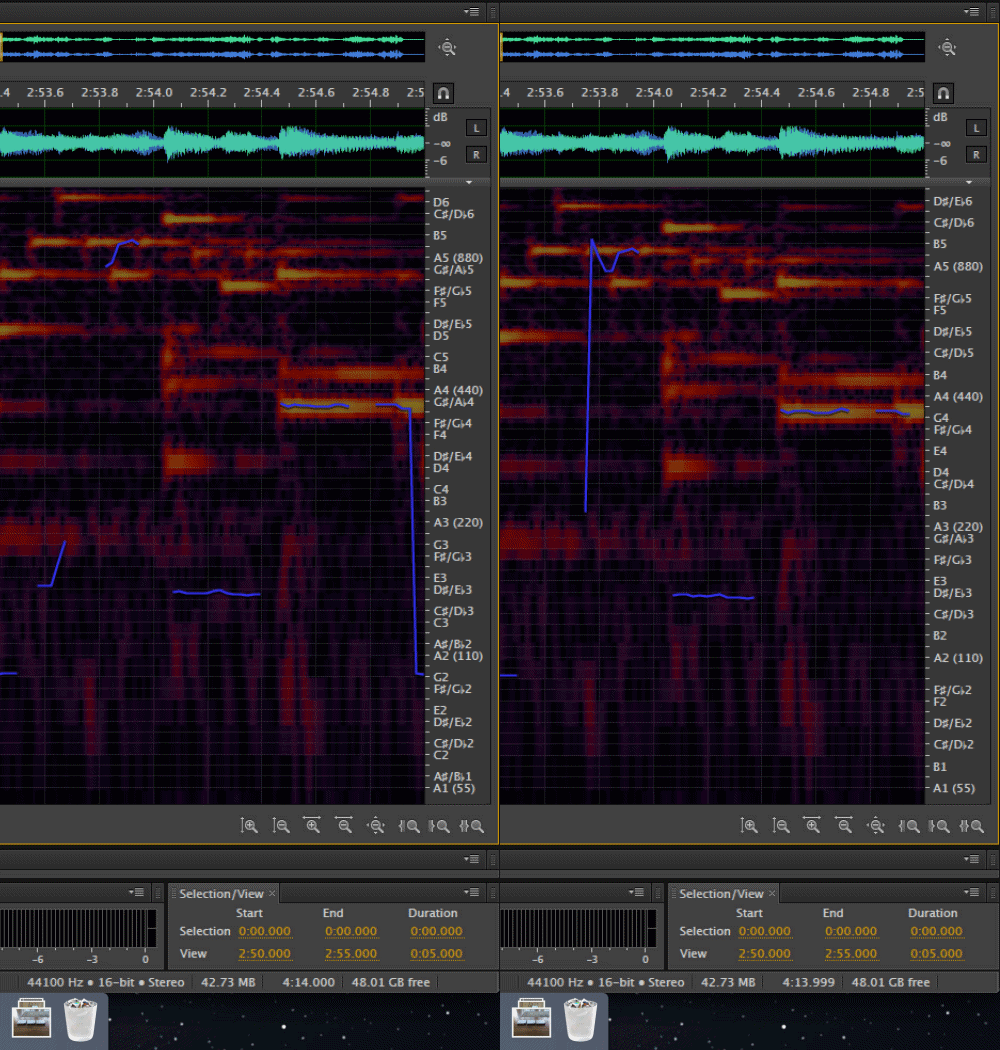
someone just deleted 3~5 points on timeline and saved as another file(as same format)

but I found that there is little different between two files (as you see)

I know this difference is really unnoticeable, but just wonder why it happens

Is there anyone who knows why it happens?

    This topic has been closed for replies.
    Correct answer ryclark

    I wouldn't have thought so. If it is a slight sample rate discrepancy for some reason Audition will just play it back at the correct sample rate with a very slight unnoticeable pitch shift.

    1 reply

    ryclark
    Participating Frequently
    September 12, 2017

    So it appears to be a slight pitch difference. There shouldn't be any reason why this would happen whilst saving a file unless some sort of format change was done with respect to sample rate. What format was the file saved as? Were the two images grabbed at more or less the same time on your PC running Audition?

    Participant
    September 12, 2017

    He(someone) saved them as .WAV, and same sample rate and etc

    I think it is uncommon though, any possiblity of noise or rendering problem?

    ryclark
    ryclarkCorrect answer
    Participating Frequently
    September 12, 2017

    I wouldn't have thought so. If it is a slight sample rate discrepancy for some reason Audition will just play it back at the correct sample rate with a very slight unnoticeable pitch shift.