
shauns82460770
Inspiring
May 2, 2018
Answered

Distorted Audio

  • May 2, 2018
  • 1 reply
  • 568 views

Hey folks,

Whenever I start Adobe Audition (CC 2018), the audio becomes distorted. The audio quality becomes rather "tinny" and loses its low-end. Whenever I click out of the program - to go to the browser to play a YouTube clip or something - the audio switches back to optimal quality.

I'm working on Mac OS High Sierra 10.13.2.

Any ideas would be greatly appreciated.

Thanks!

-Shaun
This topic has been closed for replies.
Correct answer shauns82460770

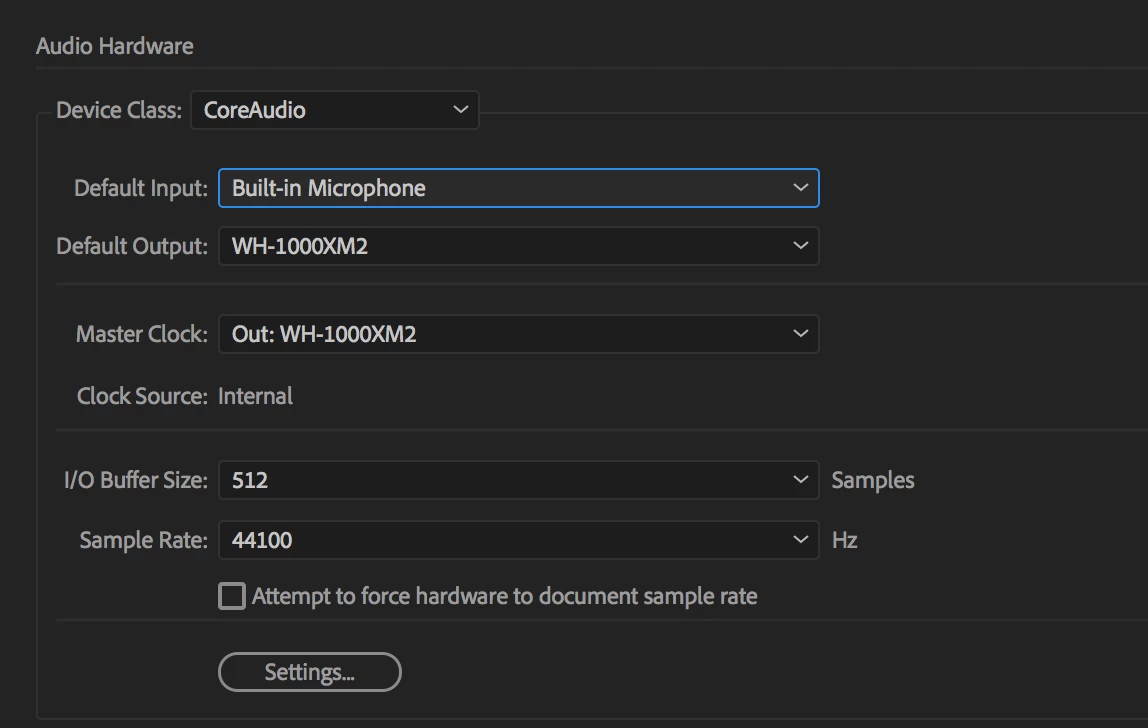
Resolved. Initially I had both my 'Default Input' and 'Default Output' set to my headphones (WH-1000XM2). The issue was cleared when I set the 'Default Input' back to Built-In Microphone.

1 reply

shauns82460770
shauns82460770AuthorCorrect answer
Inspiring
May 30, 2018

Resolved. Initially I had both my 'Default Input' and 'Default Output' set to my headphones (WH-1000XM2). The issue was cleared when I set the 'Default Input' back to Built-In Microphone.