
Participating Frequently
February 15, 2021
Answered

Dropped samples suddenly making my audio tracks choppy - OS update to blame???

  • February 15, 2021
  • 2 replies
  • 2500 views

I'm editing a multitrack session, and suddenly I keep getting "Detected Dropped Samples" alerts and all of my audio is choppy. When I open individual clips in Waveform, it sounds perfect, but in Multitrack it's awful. 


I'm pretty sure I wasn't having this issue until I upgraded my OS to the latest Catalina, so perhaps that's a culprit? 


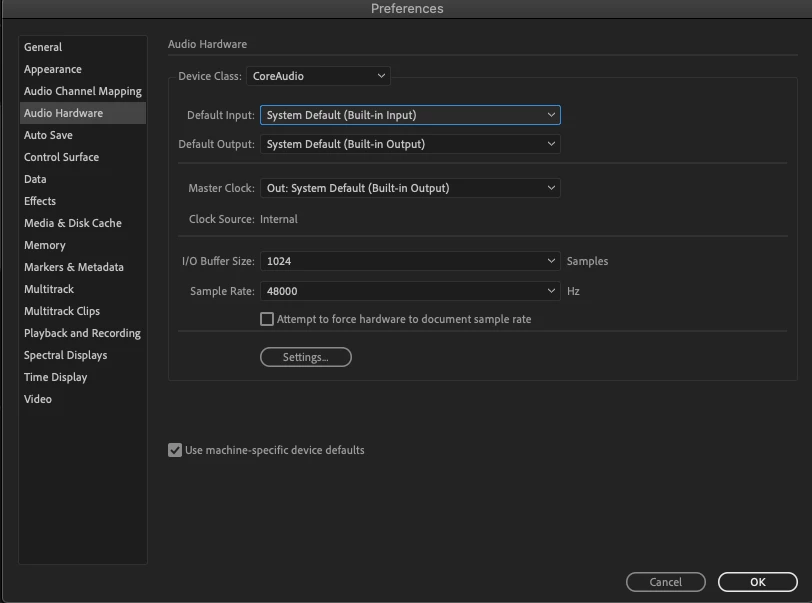
Below are my audio hardware settings. I had changed the buffer size to 1024 after doing a little research into the issue, but that's not helping. Only inputs are System Default and Movavi Sound Grabber. Any thoughts?


Running on a 2012 Mac Mini, with following specs:

OS: macOS Catalina Ver 10.15.7

Processor: 2.5 GHz Dual-Core Intel i5

Memory: 8GB 1600 MHz DDR3


Again - was not having issues whatsoever, until after I upgraded my OS. Would reverting back to an earlier OS (if possible) solve the issue?
 

This topic has been closed for replies.
Correct answer SteveG_AudioMasters_

In general, getting a 'dropped samples' message in Multitrack, but having the file play correctly in Waveform view indicates that for whatever reason, the hard drive cannot stream fast enough to Audition to achieve continuous playing. But this is a Mac, so I can't make any more suggestions because I don't have one. The I/O buffer could potentially cause this to be an issue, and it's worth increasing the size of that, at least to see if it alters the situation. If it does, then that's quite a good indication of where the problem might be.

2 replies

SuiteSpot
Inspiring
February 16, 2021

As well as everything else that has been said make sure that the session and audio hardware are set to the same sample rate otherwise Audition has to resample on the fly and that can add to the issue.

Try ticking the option "Attempt to force hardware to document sample rate"

SteveG_AudioMasters_
Community Expert
SteveG_AudioMasters_Community ExpertCorrect answer
Community Expert
February 15, 2021

In general, getting a 'dropped samples' message in Multitrack, but having the file play correctly in Waveform view indicates that for whatever reason, the hard drive cannot stream fast enough to Audition to achieve continuous playing. But this is a Mac, so I can't make any more suggestions because I don't have one. The I/O buffer could potentially cause this to be an issue, and it's worth increasing the size of that, at least to see if it alters the situation. If it does, then that's quite a good indication of where the problem might be.

Participating Frequently
February 16, 2021

That was it! I increased my rate from 1024 to 2048 and it works like a dream again! Thanks a ton!

Participant
April 30, 2023

Thanks for the comment,i did not know what caused mine until i read this to realise since i bought my Macbook air,it was automatically on 512 i/o sample rate