
DavidSweeneyBear
Inspiring
January 30, 2019
Answered

Editing - faster selection of audio segments

  • January 30, 2019
  • 1 reply
  • 587 views

Hi all, I produce audiobooks and have been looking for ways to streamline my editing process.

I use keyboard shortcuts 99% of the time. I use mostly arrow keys and ctrl+shift to select regions of audio that i need to delete or otherwise manipulate.

What i'm looking for is a way to skip the selection forward or backward to the next or previous significant slice of audio quickly without having to hold down the arrow key, which is a hit and miss affair anyway.

I've investigated using zero crossings, but this doesnt seem to work very well as it is far too fine a method of adjustment, it seems to see zero crossing everywhere, even in apparently empty sections. I've also seen in the pdf manual i have that it mentions "find beats" which sounds like it might work for me but my version of audition doesn't seem to have it.

Does anyone have any suggestions? Many thanks.
    This topic has been closed for replies.
    Correct answer SteveG_AudioMasters_

    davidsweeneybear  wrote

    I've investigated using zero crossings, but this doesnt seem to work very well as it is far too fine a method of adjustment, it seems to see zero crossing everywhere, even in apparently empty sections. I've also seen in the pdf manual i have that it mentions "find beats" which sounds like it might work for me but my version of audition doesn't seem to have it.

    Does anyone have any suggestions? Many thanks.

    All signals pass through zero all of the time (that's what waveforms do) and this is only meant to be a way of accurately locating a zero-crossing for the purposes of minimising clicks, especially on looped content. And unless you make a really small selection, you will be overwhelmed by the results!

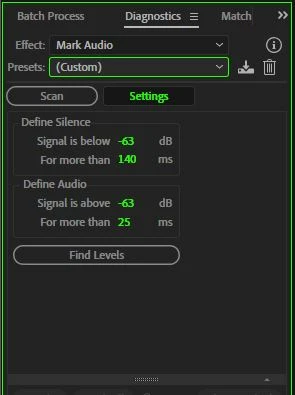
    'Find Beats' was a music production process, and since Audition isn't really music production software, it's not there in that form any more. What is there though, and may be more helpful, is Diagnostics. You can get this to do several things, and it sounds as though, with the right settings, this might get you a bit further:

    Give that a try...

    1 reply

    SteveG_AudioMasters_
    Community Expert
    SteveG_AudioMasters_Community ExpertCorrect answer
    Community Expert
    January 30, 2019

    davidsweeneybear  wrote

    I've investigated using zero crossings, but this doesnt seem to work very well as it is far too fine a method of adjustment, it seems to see zero crossing everywhere, even in apparently empty sections. I've also seen in the pdf manual i have that it mentions "find beats" which sounds like it might work for me but my version of audition doesn't seem to have it.

    Does anyone have any suggestions? Many thanks.

    All signals pass through zero all of the time (that's what waveforms do) and this is only meant to be a way of accurately locating a zero-crossing for the purposes of minimising clicks, especially on looped content. And unless you make a really small selection, you will be overwhelmed by the results!

    'Find Beats' was a music production process, and since Audition isn't really music production software, it's not there in that form any more. What is there though, and may be more helpful, is Diagnostics. You can get this to do several things, and it sounds as though, with the right settings, this might get you a bit further:

    Give that a try...

    DavidSweeneyBear
    Inspiring
    January 31, 2019

    That worked a treat Steve, thanks a million! I can now skip between markers using alt+arrow keys and use a keyboard shortcut to mark In and Out point of selection. Much faster and more accurate.

    <br>~ David Sweeney-Bear ~