Participant
January 6, 2022
Question

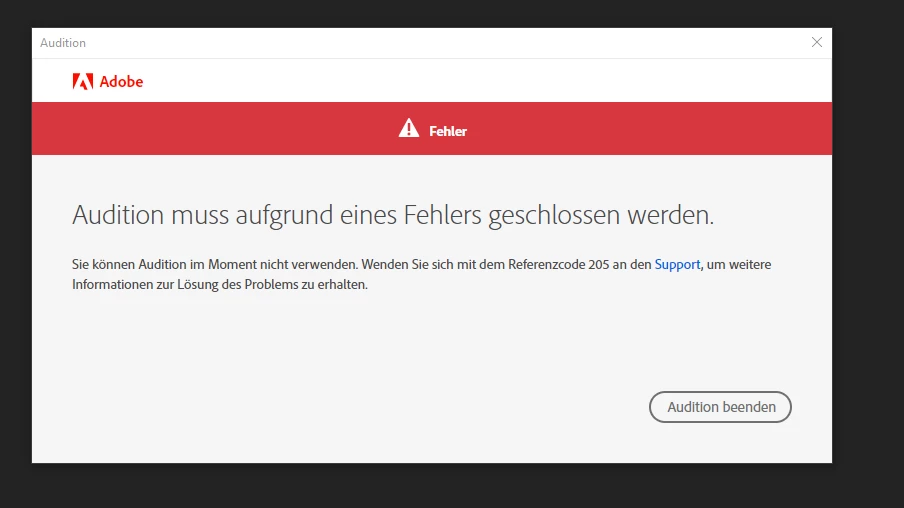
Error 205 when opening Audition

  • January 6, 2022
  • 1 reply
  • 871 views

Hey,

I keep getting Error 205 when I open Audition.

I'm on Windows 10 20H2. Any other Adobe program just works fine.

I tried reinstalling it but it didn't help.
 

This topic has been closed for replies.

1 reply

SteveG_AudioMasters_
Community Expert
Community Expert
January 6, 2022

That error means you've got a corrupted download. Reinstalling won't help - you need to start over with a fresh download.

Participant
March 2, 2022

What exactly does a fresh download entail here? I have been getting a similar error (only with Audition) and uninstalled the program entirely then reinstalled it. Does a fresh download them uninstalling all of the CC programs and downloading again?

SteveG_AudioMasters_
Community Expert
Community Expert
March 2, 2022

The best way to do this, especially if there are potential issues with the previous installation, is to do the uninstalling using the Adobe CCcleaner app. This gets rid of a lot more background files as well, and means that your reinstallation will be cleaner than it would be if you just used the Windows uninstaller. No you don't have to remove everything - the app gives you a choice of what you uninstall. Reinstallation should take place as normal from the CC desktop app, in the same way that you installed it in the first place.
