
June 25, 2018
Question

"Error: General Import Failure -7"

  • June 25, 2018
  • 6 replies
  • 3579 views

My co-worker recently upgraded their Mac OSX version of Adobe Audition from CC 2017 10.0.2 to CC 2018 11.1.0. The install went fine and there were no issues until trying to open a flac file, and get this message:
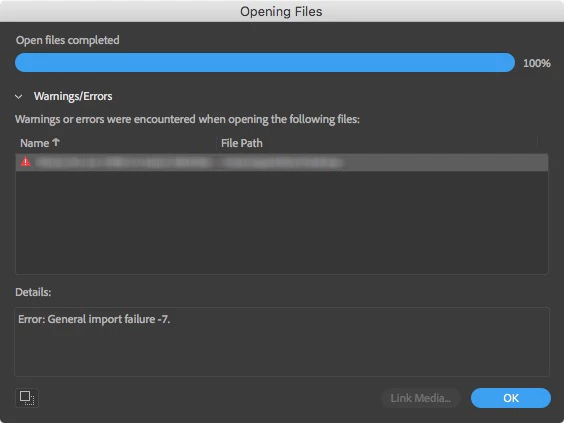
We thought it was a bad flac so we tried another, same result. Opened up CC 2017, and all the flacs loaded just fine. Aifs, wavs, and all other formats open no problem. Tried Google searching "General import failure", but there was nothing.

This is what the Audition log kept saying:

Ticks = 11461      <140735104978944> <AmioPlugin> <5> An unknown exception was caught (Code 4).

Ticks = 11461      <140735104978944> <AmioPlugin> <5> Caught Amio Plug-In Exception when calling command: 5

Ticks = 62844      <140735104978944> <AmioPlugin> <5> An unknown exception was caught (Code 4).

Ticks = 62844      <140735104978944> <AmioPlugin> <5> Caught Amio Plug-In Exception when calling command: 5

Ticks = 155725      <140735104978944> <AmioPlugin> <5> An unknown exception was caught (Code 4).

Ticks = 155725      <140735104978944> <AmioPlugin> <5> Caught Amio Plug-In Exception when calling command: 5

Ticks = 169994      <140735104978944> <AmioPlugin> <5> An unknown exception was caught (Code 4).

Ticks = 169995      <140735104978944> <AmioPlugin> <5> Caught Amio Plug-In Exception when calling command: 5

Ticks = 259901      <140735104978944> <AmioPlugin> <5> An unknown exception was caught (Code 4).

Ticks = 259901      <140735104978944> <AmioPlugin> <5> Caught Amio Plug-In Exception when calling command: 5

I have no idea what's going on, and hoping someone can assist. The other thing of note is some previously created favorites no longer work, giving the following error: "The [Favorite] favorite cannot be applied to this file". Note not all of them have this issue, and they work in the previous version.

This topic has been closed for replies.

6 replies

October 6, 2018

So I haven't heard anything nor been contacted by anyone from Adobe regarding this issue? How can I escalate this?

SuiteSpot
Inspiring
October 6, 2018

It probably doesn't help but I don't get this error importing a flac file into any version of Audition 2018, 2017, etc

Maybe its a Mac only thing ?
ryclark are you on a Mac or PC?

September 16, 2018

Bug post created here: https://adobe-video.uservoice.com/forums/911314-audition/suggestions/35415298-error-general-import-failure-7

I already emailed audbugs@adobe.com a good number of days ago but have not received anything in response.

September 10, 2018

Opened up just fine in 2017. In 2018......you guessed it, same error. I can also confirm it isn't an issue with my user profile, as I just created a new one admin account, and receive the same results.

September 10, 2018

It happens on literally any flac file. As an example, I created 10 second silent flac audio file in 2017. Closed 2017, reopened it and successfully loaded the test flac. Closed it, opened 2018, and tried to load the test flac. No dice, same error.

ryclark
Participating Frequently
September 10, 2018

Did the same here with a one minute .flac file of tone created in CC 2017. Opened successfully in Audion CC 2018 with no problems.

You can download from here to try on your system. Dropbox - Untitled 1.flac

September 5, 2018

I wanted to provide an update to this. It's not just my co-worker's computer who is having this problem, and it's not just related to their version of Audition. Tonight I downloaded the official trial version of Audition 2018 from Creative Cloud, and once installed on a clean user profile and trying to open a flac file, it's giving the EXACT same error. So there's definitely something wrong.

How can this get escalated?

SuiteSpot
Inspiring
September 5, 2018

Can you post a link to one of these flac files ?

It would be interesting to see if it happens to anyone else with that same file

ryclark
Participating Frequently
September 5, 2018

Otherwise treat it as a crash and report as in the FAQ Audition Crashed. Now what? to get the info through to the developers.

June 30, 2018

Anything? Kind left in a lurch here.

ryclark
Participating Frequently
July 1, 2018

Probably best to log it as a bug. Also if you want the developers to take a look follow the instructions in Audition Crashed. Now what? Although not a crash this is the quickest way to get info to the devs.

July 2, 2018

Where is the 'Adobe Crash Reporter Tool'?