
Participant
February 11, 2019
Answered

Error running Adobe Audition CC 2019

  • February 11, 2019
  • 1 reply
  • 1658 views

Good afternoon, I was wondering if you could help me. As soon as I run Adobe Audition, this error appears:
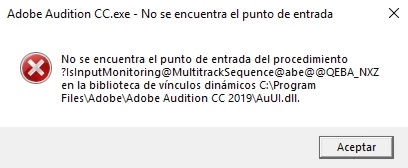
And I can't fix it. I've searched in this forum and on the internet, even YouTube, but nothing seems to work. I even reinstalled the program several times, but the problem persists. I use windows 10 Pro (64 bits), it's fully updated, and this is the list of installed Visual C++ versions in my system, which I read could be causing problems:
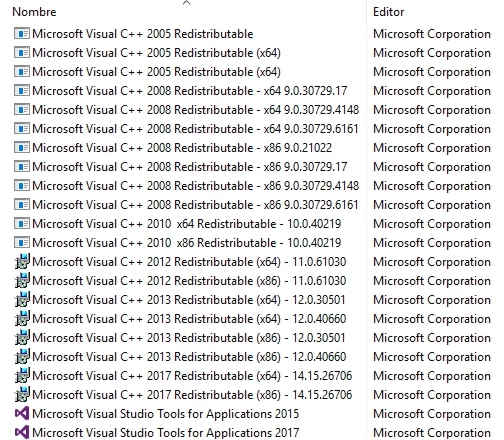

I think that none of those required by Adobe are missing. I would appreciate any help on this matter, the truth is that I have no idea because I already tried everything. Thank you very much in advance!

Moderator: Moved from Adobe Creative Cloud to Audition CS5.5, CS6 & CC

    This topic has been closed for replies.
    Correct answer kglad

    oops, i assumed your posted error message mentiond ms vz c++ but see now that it does not.

    reset your preferences - https://forums.adobe.com/thread/1079494

    restart your computer

    if the problem continues, uninstall and then reinstall audition, Uninstall or remove Creative Cloud apps

    1 reply

    kglad
    Community Expert
    Community Expert
    February 11, 2019

    try 2015

    dafaherAuthor
    Participant
    February 11, 2019

    Hi kglad, thank you very much for your suggestion. Yes, I tried it before but it didn't work either. The funny thing is that experimenting with these apps, I discovered that if I install Visual C++ 2017 (I need it for a development tool), the 2015 version is deleted from the system. Anyway, Adobe Audition doesn't work with any of them, 2015 or 2017. I have no idea what is going on, and it only happens with Audition, the rest of the Adobe programs work correctly.

    kglad
    Community Expert
    kgladCommunity ExpertCorrect answer
    Community Expert
    February 11, 2019

    oops, i assumed your posted error message mentiond ms vz c++ but see now that it does not.

    reset your preferences - https://forums.adobe.com/thread/1079494

    restart your computer

    if the problem continues, uninstall and then reinstall audition, Uninstall or remove Creative Cloud apps