
Inspiring
August 30, 2023
Question

Even out wonky/offset waveform (not normalise)

  • August 30, 2023
  • 1 reply
  • 970 views

Here is a single waveform of an entire project from Premiere Pro, consisting of multiple audio tracks:
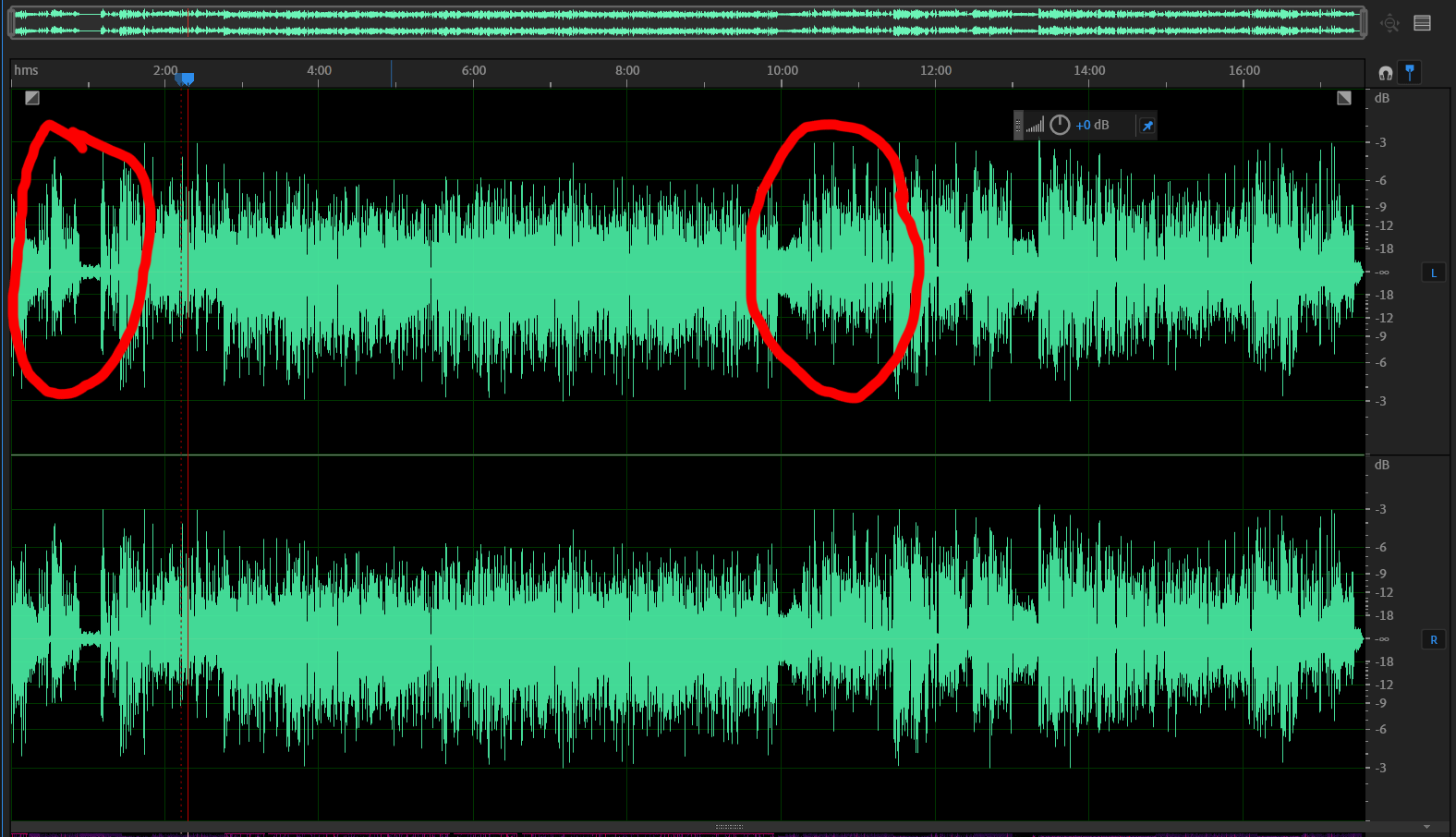
 

I've highlighted a couple of areas where the waveform has bias above the 0db line (it occurs in both left and right channels but I've just highlighted the left channel).

I know there is a one-click solution to even out the waveform so that it looks more like the section between 3-10 minutes, but I don't remember what it is! Any pointers?

TIA.

This topic has been closed for replies.

1 reply

Inspiring
August 30, 2023

I wrote this 9 years ago:


"Asymmetric Wavefirms: Should You Be Concerned?"


Make sure you recognize how DC Offset differs.


-paul.

@produceNewMedia

Inspiring
August 30, 2023

Thanks for that, Paul. That goes some way to explain what is going on and now I know what nomenclature to use, which was half my problem with finding a solution. My issue is an asymmetric waveform.

The one-click solution I was looking for is under Effects/Stereo Imagery/Graphic Phase Shifter. If I set this to +80db it fixes some of the asymmetric issues, but not all.

I've gone back to each source clip and noticed that many of my audio clips are asymetric, which I hadn't noticed before. Here is a clip recorded on the GH5 with a Sennheiser MKE600 via the XLR adapter mounted on the hotshoe, gain and lowcut set to zero (I just increased db in Audition to visibly magnify the difference)

This doesn't look like a DC offset issue because, as I understand it, the bassline would be shifted above (or below) 0db.

So, what is causing this asymmetry? Is this just a manifestation of my camera set-up and to be expected? In which case, is it just a case of running Graphic Phase Shifter on every clip?

What is interesting is that in my original screen grab, the section between 3-10 minutes is also audio from the GH5, but that doesn't look asymmetric.

Inspiring
August 30, 2023

I wouldn't be overly concerned with the above example. As far as the root cause - 'could be any number of things including what I referenced in the documentation. Eg. it's common for a mixer supplied or mic supplied hi-pass filter to cause the anomoly.


You can certainly use the Audition supplied Graphic Phase Shifter tool to attempt to "correct" your clips. However it will require a significant amount of trial and error.


Best case is to use Adapative Phase Rotation in iZotope RX. And the processing option is also avaialble in Acoustica by Acon Digital. In essence there's no tweaking. Both tool options function as an offline adaptive process. Press a button and let it do it's thing. Note the least expensive version of RX includes the option. So there's no need to spend big $$ on the more advanced versions.


-paul.