Legend
April 28, 2020
Answered

Export Audio Clips From Audition Using " Markers Convert To Range "

  • April 28, 2020
  • 1 reply
  • 2727 views

Hello Everyone.

I watched this Tutorial on Exporting Clips using Markers, and Convert to Range.

What you guys think about this Tutorial

Thanks.

https://www.youtube.com/watch?v=47iTd9-HLtQ


This topic has been closed for replies.
Correct answer SteveG_AudioMasters_

Good job you asked - he's missed some major points completely.


Firstly, by far and away the quickest way to create a marker range (so without a load of extra clicks) is simply to select the range in the first place using the mouse and hit F8 - instant range created. But the most important thing he's completely failed to do is explain why he's created all those files when he doesn't need to!


The whole idea of marker ranges in the context of assembling a final program is that you want the marker ranges in Multitrack view, not a load of files. And that's easy to do without creating a huge array of duplicate files - you just highlight all of them, and right-click on the list:
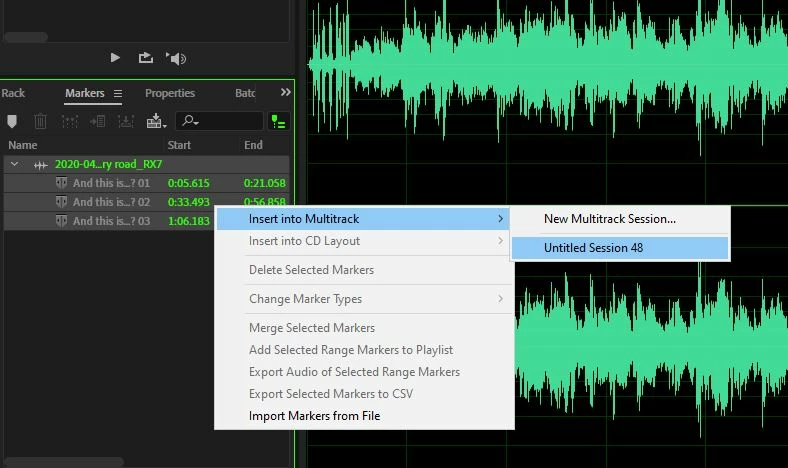
It's that simple. But the real issue here is that he's massively restricted what he can do with the results!


Okay, he's got all those files he created, and he can import them into a multitrack session. Now let's suppose he discovers that he wants to extend one of them slightly - just to get a bit more silence from the original around it, say. Can he? No he can't, because each file is a 'real' entity and can only be dragged out to its edges. Compare that to the situation with exporting the markers. If you drag the end of a marker range that you've inserted in multitrack as opposed to a file, it can be extended out to the furthest extent of the original file if you want to - that's the final limit.


So what has he actually achieved? A load of redundent clip files, and a complete lack of editing flexibility. Result! (not)


So yes, you were quite correct to question this, I'd say. Do you think I ought to add a comment to his YouTube video? 😉

1 reply

SteveG_AudioMasters_
Community Expert
SteveG_AudioMasters_Community ExpertCorrect answer
Community Expert
April 28, 2020

Good job you asked - he's missed some major points completely.


Firstly, by far and away the quickest way to create a marker range (so without a load of extra clicks) is simply to select the range in the first place using the mouse and hit F8 - instant range created. But the most important thing he's completely failed to do is explain why he's created all those files when he doesn't need to!


The whole idea of marker ranges in the context of assembling a final program is that you want the marker ranges in Multitrack view, not a load of files. And that's easy to do without creating a huge array of duplicate files - you just highlight all of them, and right-click on the list:

It's that simple. But the real issue here is that he's massively restricted what he can do with the results!


Okay, he's got all those files he created, and he can import them into a multitrack session. Now let's suppose he discovers that he wants to extend one of them slightly - just to get a bit more silence from the original around it, say. Can he? No he can't, because each file is a 'real' entity and can only be dragged out to its edges. Compare that to the situation with exporting the markers. If you drag the end of a marker range that you've inserted in multitrack as opposed to a file, it can be extended out to the furthest extent of the original file if you want to - that's the final limit.


So what has he actually achieved? A load of redundent clip files, and a complete lack of editing flexibility. Result! (not)


So yes, you were quite correct to question this, I'd say. Do you think I ought to add a comment to his YouTube video? 😉

Legend
April 28, 2020

Dear Steve G.

Thank you very much