Inspiring
March 19, 2019
Answered

Export mulittrack mixdown changes gain at start of clip

  • March 19, 2019
  • 2 replies
  • 868 views

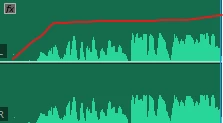
I am editing audio from premiere (Edit in Adobe Audition). All effects and volume/pan info are removed in settings before export. I add my effect stack in Audtion and play back... sounds great during live preview. On save/export (Mixdown > Stereo). The clip has a very noticeable 1second ramp up in volume. It start quiet and increases to where I had set it. How do I prevent this from happening? Why am I not hearing it until export? 
    This topic has been closed for replies.
    Correct answer SteveG_AudioMasters_

    marryj22651191  wrote

    You can export your multitrack sessions to multiple formats by sending audio and video from Audition to Adobe Media Encoder. Adobe Media Encoder includes a series of formats and presets that allow you to render and publish high-quality audio and video output from Audition.

    I'm afraid that I fail to see even the slightest relevance of this reply to the original question.

    ***************************************************

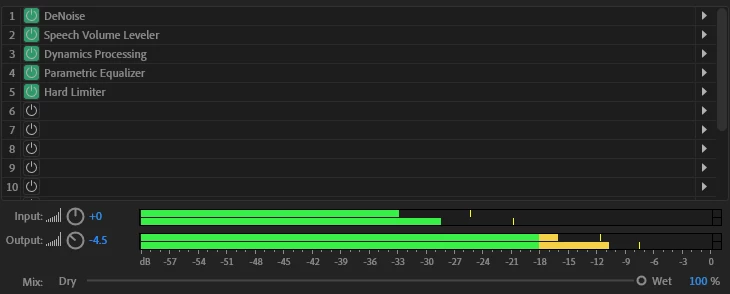
    Following on from what ryclark mentioned, there appear to be two possibilities in the processing list. Before the speech volume leveler is DeNoise - and if this is set to be adaptive, a similar problem could arise. Put both of them together, and it's almost inevitable!

    2 replies

    March 20, 2019

    You can export your multitrack sessions to multiple formats by sending audio and video from Audition to Adobe Media Encoder. Adobe Media Encoder includes a series of formats and presets that allow you to render and publish high-quality audio and video output from Audition.

    SteveG_AudioMasters_
    Community Expert
    SteveG_AudioMasters_Community ExpertCorrect answer
    Community Expert
    March 20, 2019

    marryj22651191  wrote

    You can export your multitrack sessions to multiple formats by sending audio and video from Audition to Adobe Media Encoder. Adobe Media Encoder includes a series of formats and presets that allow you to render and publish high-quality audio and video output from Audition.

    I'm afraid that I fail to see even the slightest relevance of this reply to the original question.

    ***************************************************

    Following on from what ryclark mentioned, there appear to be two possibilities in the processing list. Before the speech volume leveler is DeNoise - and if this is set to be adaptive, a similar problem could arise. Put both of them together, and it's almost inevitable!

    MrChristoAuthor
    Inspiring
    March 20, 2019

    SteveG(AudioMasters)​ This did it. deactivating the de-noise fixed the issue. Re-ordering them also prevented the undesired results. I have currently replaced the denoise with dereverb which is maybe more appropriate for what I was using it for anyway and doesn't produce the ramp up in volume at the start.

    Thank you to everyone for your help!

    ryclark
    Participating Frequently
    March 19, 2019

    It may be the Speech Volume Leveler effect re-learning how much gain to apply as the Export happens. You could try to Freeze the effects on the track before Exporting.

    MrChristoAuthor
    Inspiring
    March 20, 2019

    Hey ryclark, I assumed it was something I didn't fully understand about the way the effects functioned and tried to pre-render (lightning bolt icon in effects panel) thinking it would apply the effects as I heard them and it still managed to ramp up the initial audio. Is this what you meant by 'freeze'?