Participant
Nov 3, 2019 5:25 PM UTC
Answered

Exporting different tracks in mixdown as separate files

Hey Adobe Support Community,


I have one audio file with 20 different tracks, which I opened an empty stereo session for. I separated the different sections into tracks 1-20, but there is no option that I can find that allows me to export those tracks as separate mp3 or aac files. Maybe I am just missing something in plain sight, but if you could help me with this issue, that would be great!


NOTE: I want to export the files as mp3, highest quality possible.

This topic is closed to new replies. Start a new post to keep the conversation going.
SteveG_AudioMasters_
SteveG_AudioMasters_Correct answer
Community Expert
Nov 3, 2019 7:17 PM UTC

Tracks in Audition can be separated and mixed down, but I suspect that's not what you mean by tracks...


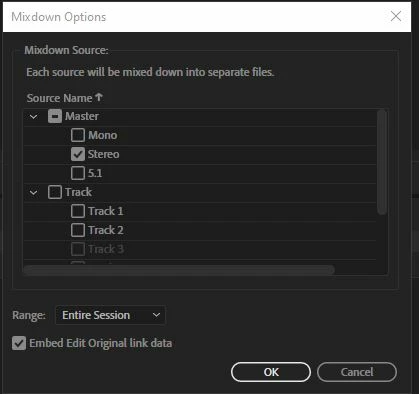
If you import a single file into a track on Audition and split it up, then what you have is clips on a track - not tracks; tracks stack vertically, not horizontally. But if you have actually split this file into clips, then all you need to do is grab each one and put it onto a track of its own. Then, when you go to Export.Mixdown>Entire selection, you get some options. In Format Setup, you can select the file type, and in Mixdown Options,  you get a display like this:

 ...where you can select the tracks you want to export. If you select the appropriate ones, they'll all be mixed down to separate files.

9 replies

Participant
Mar 18, 2024 5:26 AM UTC

The mixdown option to export all tracks separately is what I am looking for - the issue is that the effects on the Master channel are not exported per track.

I have many tracks with the exact same effects applied. Instead of applying the effects to each track individually I have them only applied to the master output mix. 


When exporting each track individually (soloing the track, then exporting) - the master mix effects are applied to the export.

When exporting all the tracks using the mixdown option the master mix effects are not applied.


So how do I export many tracks in one go with the master mix effects being applied?

Thank you!

Translate
SteveG_AudioMasters_
Community Expert
Community Expert
Mar 18, 2024 9:42 AM UTC

We're not absolutely sure, but something similar has been reported recently relating to effects not being applied at mixdown, so it may be a bug.

Translate
Nov 14, 2019 5:25 PM UTC

thankx for sharing with us

Translate
SteveG_AudioMasters_
Community Expert
SteveG_AudioMasters_Community ExpertCorrect answer
Community Expert
Nov 3, 2019 7:17 PM UTC

Tracks in Audition can be separated and mixed down, but I suspect that's not what you mean by tracks...


If you import a single file into a track on Audition and split it up, then what you have is clips on a track - not tracks; tracks stack vertically, not horizontally. But if you have actually split this file into clips, then all you need to do is grab each one and put it onto a track of its own. Then, when you go to Export.Mixdown>Entire selection, you get some options. In Format Setup, you can select the file type, and in Mixdown Options,  you get a display like this:

 ...where you can select the tracks you want to export. If you select the appropriate ones, they'll all be mixed down to separate files.

Translate
Participant
Nov 5, 2019 5:22 AM UTC

Thanks so much! That is exactly what I was looking for and helped a ton. Have a great week!

Translate