
LaSalamander
Inspiring
July 10, 2018
Answered

"Exporting File..." when saving session?

  • July 10, 2018
  • 1 reply
  • 509 views

Can someone tell me why I get this when saving a session that uses files that aren't in the same directory as the sesx file? Files are being duplicated unnecessarily!
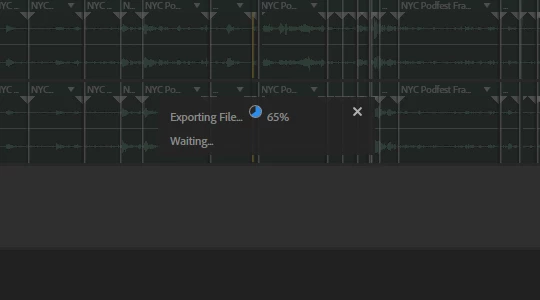
And more importantly, how I can I stop Audition CC from doing this?

    This topic has been closed for replies.
    Correct answer SteveG_AudioMasters_

    Edit>Preferences>General and down the bottom, Reset All Warning Dialogs. This, if you don't dismiss it again, will give you options as to whether you want to save copies of files in the session folder or not.

    1 reply

    SteveG_AudioMasters_
    Community Expert
    SteveG_AudioMasters_Community ExpertCorrect answer
    Community Expert
    July 10, 2018

    Edit>Preferences>General and down the bottom, Reset All Warning Dialogs. This, if you don't dismiss it again, will give you options as to whether you want to save copies of files in the session folder or not.

    LaSalamander
    Inspiring
    July 10, 2018

    Thanks so much! Not at all an obvious way to find such a control. I wish there was a specific checkbox for this sort of thing somewhere.

    ryclark
    Participating Frequently
    July 11, 2018

    Well normally these sort of warnings are set to show by default when Audition is first installed. So generally unless you have turned them off previously on purpose by ticking in the warning box that pops up they should always ask.