
Participating Frequently
November 12, 2017
Answered

Exporting silence

  • November 12, 2017
  • 3 replies
  • 4846 views

Hello,

I've been using Audtion for awhile constructing a stereo mix of a few tracks. Nothing unusual, standard multi-track session. Up until the new CC download a couple/few weeks back, I never had the problem I am having now. When I export the time selection shown in the image attached, the first track is silent. It is very, very strange. The only thing I can track this emerging problem to was the new update.

In the corresponding picture, you'll see the top track is the track in question with the underlying track, the result of the export of soloed track 1 (above it). You'll see that silence is all that results. I have tried numerous little tweaks to solve what should not be an issue to begin with. I am dumbfounded as to why this first track will not export with audio. When I play it back in real time, it plays back perfectly.

Also, if I increase the time selection to include track 3 in the export, that track emerges after the silence. Again, you can see in the graphic attached how odd this is. Any help is greatly appreciated as it is a bit of a time sensitive matter.
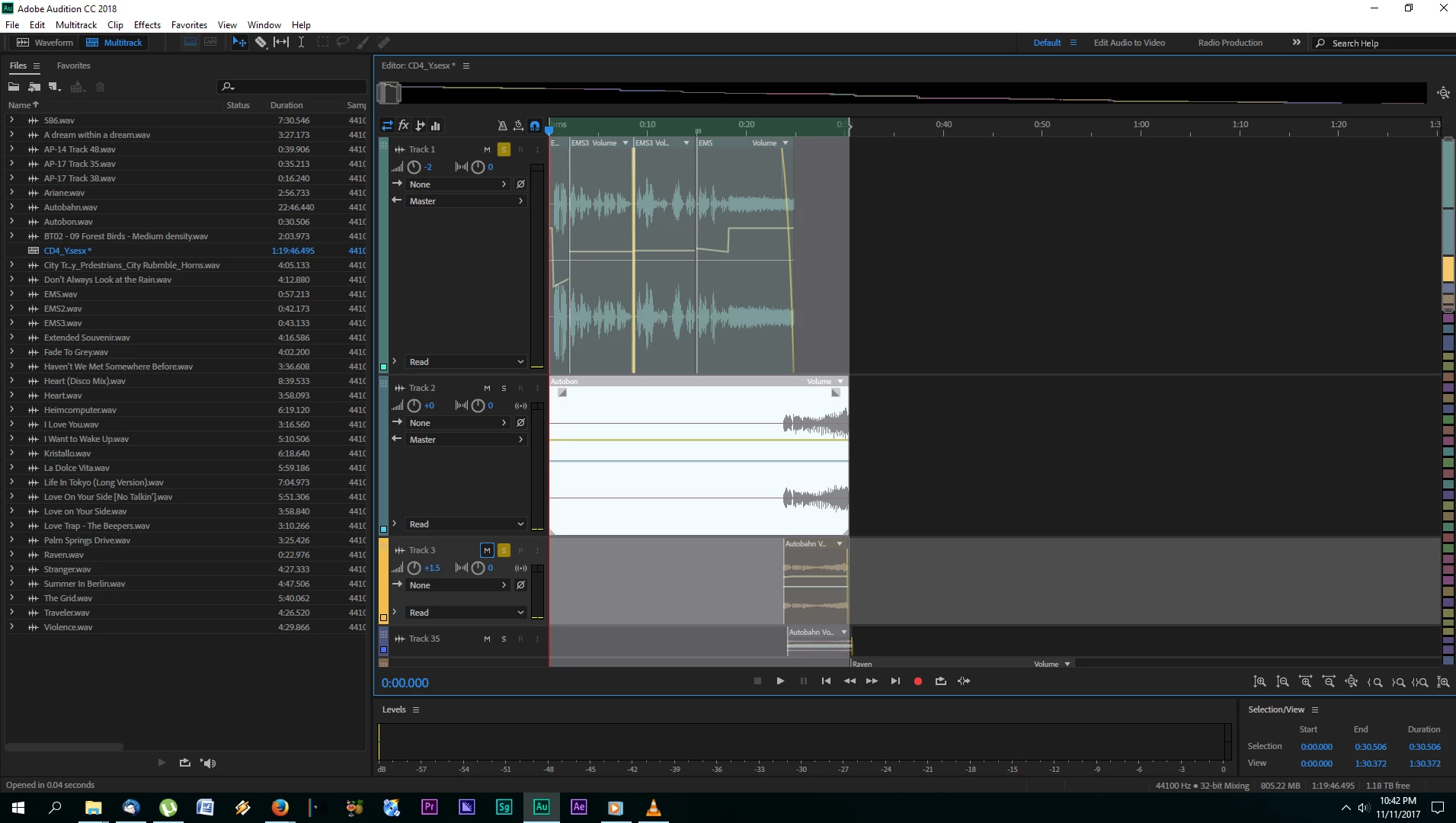
Many Thanks!

This topic has been closed for replies.
Correct answer ryclark

See Adobe's response to these bugs Export Glitched Audio in Audition CC 2018

3 replies

Known Participant
November 16, 2017

the solution to the problem is the use of  Audition 1.5 (2004)

I have a rendering error (silence or silence with clicking) when the envelopes are used on the track (even when using internal plug-ins) (CC2018). while in multitrack the sound is played back fully (along with effects)

I have to solve the problem by recording through a internal stereo mixer in any other DAW (in my case, Audition 1.5)

ryclark
ryclarkCorrect answer
Participating Frequently
November 16, 2017

See Adobe's response to these bugs Export Glitched Audio in Audition CC 2018

Participating Frequently
November 16, 2017

Ah, very interesting. At least we know that it is a bug. Just hope it doesn't take long to fix. Thanks for posting that.

Inspiring
November 15, 2017

I have run in to the same issues. After updating to Audition 2018 one of my tracks exports silent. I can't make it work. I record a multi track (3) podcast where my voice is on track 1, my guest is on track 2 and sound effects and ads are on track 3. It's worked perfectly until this upgrade. I can't wait for a fix and will have to go back to an older version of Audition until they fix this problem. Very frustrating indeed.

Participating Frequently
November 15, 2017

Thanks...yes, my entire project is suddenly on-hold until a fix comes out. Very frustrating. How can one downgrade in the meantime? I thought one could only download the current version.

Inspiring
November 15, 2017

I'm trying to figure out how to go back and download the older version I was using now. I can't waste any more time with Audition 2018.

SteveG_AudioMasters_
Community Expert
Community Expert
November 12, 2017

I take it you've tried it with the solo button off...

Can you show us a screen grab of the mixer whilst this is happening, please?

Participating Frequently
November 12, 2017

Hi Steve-

Thanks for your reply. Good point, yes, in fact most attempts were without any soloing. It was just applied in this case. I have attached an image showing the exported version of what it looks like without soloing, plus showing the state of the mixer. Same scenario as before (minus the soloing) -- the first track is rendering out as silence (shown in track 2), and then resumes on track 2 with the audio from track 3 when it comes back in as normal.

I probably made dozens of renders in the previous version of CC just up until a couple weeks ago, before the latest update, and never had a similar problem.

Appreciate the communities help in this unique scenario!

Cheers,

Darren

SteveG_AudioMasters_
Community Expert
Community Expert
November 12, 2017

Initially I'd be looking at what's happening in that FX chain. Try the export with it turned off, and if it works then, find out which effect has silenced it...